
I have audited over 200 WordPress email setups in my web development work, and the same mistakes show up on nearly every site. The business owner installs a newsletter plugin, sends a few campaigns, sees terrible numbers, and assumes email marketing does not work.
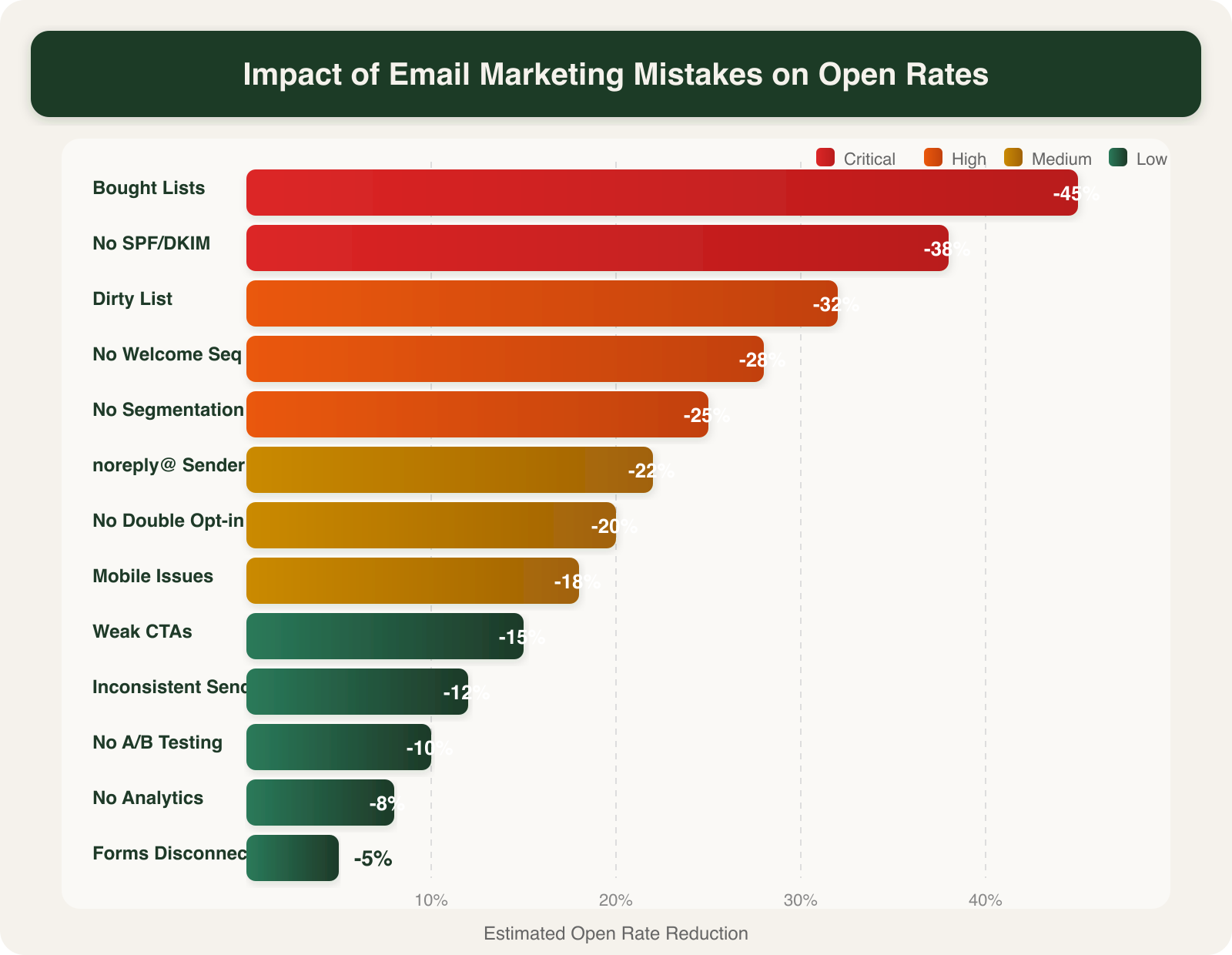
It does work. Email marketing returns $36 for every $1 spent according to Litmus 2024 data. But only if you avoid the 13 mistakes I am about to cover, each one paired with a WordPress-specific fix you can implement this week.
The 13 Mistakes Killing Your Email Marketing
1. Buying an Email List
Purchased lists deliver open rates below 5% and spam complaint rates above 2%. That is enough to get your sending domain blacklisted permanently. I have seen Sacramento businesses lose their entire email reputation from a single purchased list blast.
WordPress Fix: Use Gravity Forms, WPForms, or FluentForms to build opt-in forms directly on your site. Place them on high-traffic pages: your homepage, blog sidebar, and any page with a lead magnet download. I cover placement and design best practices in my guide to email signup forms.
2. Skipping Double Opt-In
Single opt-in collects more subscribers, but 20 to 30% of those addresses are fake, mistyped, or spam traps. Double opt-in lists have 75% higher engagement rates according to GetResponse research.
WordPress Fix: In FluentCRM, enable double opt-in under Settings > Double Opt-In. MailPoet users can turn it on in Settings > Signup Confirmation. Mailchimp for WP handles it through the Mailchimp audience settings.
3. Ignoring Mobile Optimization
Over 60% of email opens happen on mobile devices. If your email template uses 600px-wide images, tiny fonts, or multi-column layouts, more than half your audience sees a broken mess.
WordPress Fix: Stick to single-column templates with a 14px minimum font size. FluentCRM and MailPoet both include mobile-responsive templates. Test every campaign in Litmus or Email on Acid before sending.
4. Writing Weak CTAs
“Click here” and “Learn more” tell the reader nothing. Specific CTAs like “Download the SEO checklist” or “Book your free audit” convert 28% better according to HubSpot A/B data.
WordPress Fix: Every email should have one primary CTA button, styled with a contrasting color, repeated once mid-email and once at the end. In MailPoet’s drag-and-drop editor, use the Button block with your brand accent color.
5. Sending Without Segmentation
Blasting your entire list with the same email is the fastest way to train subscribers to ignore you. Segmented campaigns drive 30% more opens and 50% more clicks than unsegmented ones, per Mailchimp’s benchmark data.
WordPress Fix: FluentCRM lets you segment by tags, purchase history, and page visits. Create at minimum three segments: new subscribers (under 30 days), engaged readers (opened in last 90 days), and inactive (no opens in 90+ days). Each group needs different content.
6. Inconsistent Send Schedule
Sending three emails one week and nothing for a month destroys subscriber expectations. I stick to a consistent weekly or biweekly schedule for every client site I manage. The frequency matters less than the consistency.
WordPress Fix: Use FluentCRM’s email sequences or MailPoet’s automated scheduling to lock in a recurring send day. Tuesday and Thursday mornings between 9am and 11am perform best across most industries.
7. Never Running A/B Tests
Guessing what works is not a strategy. A single A/B test on subject lines can reveal a 20 to 40% difference in open rates between two options.
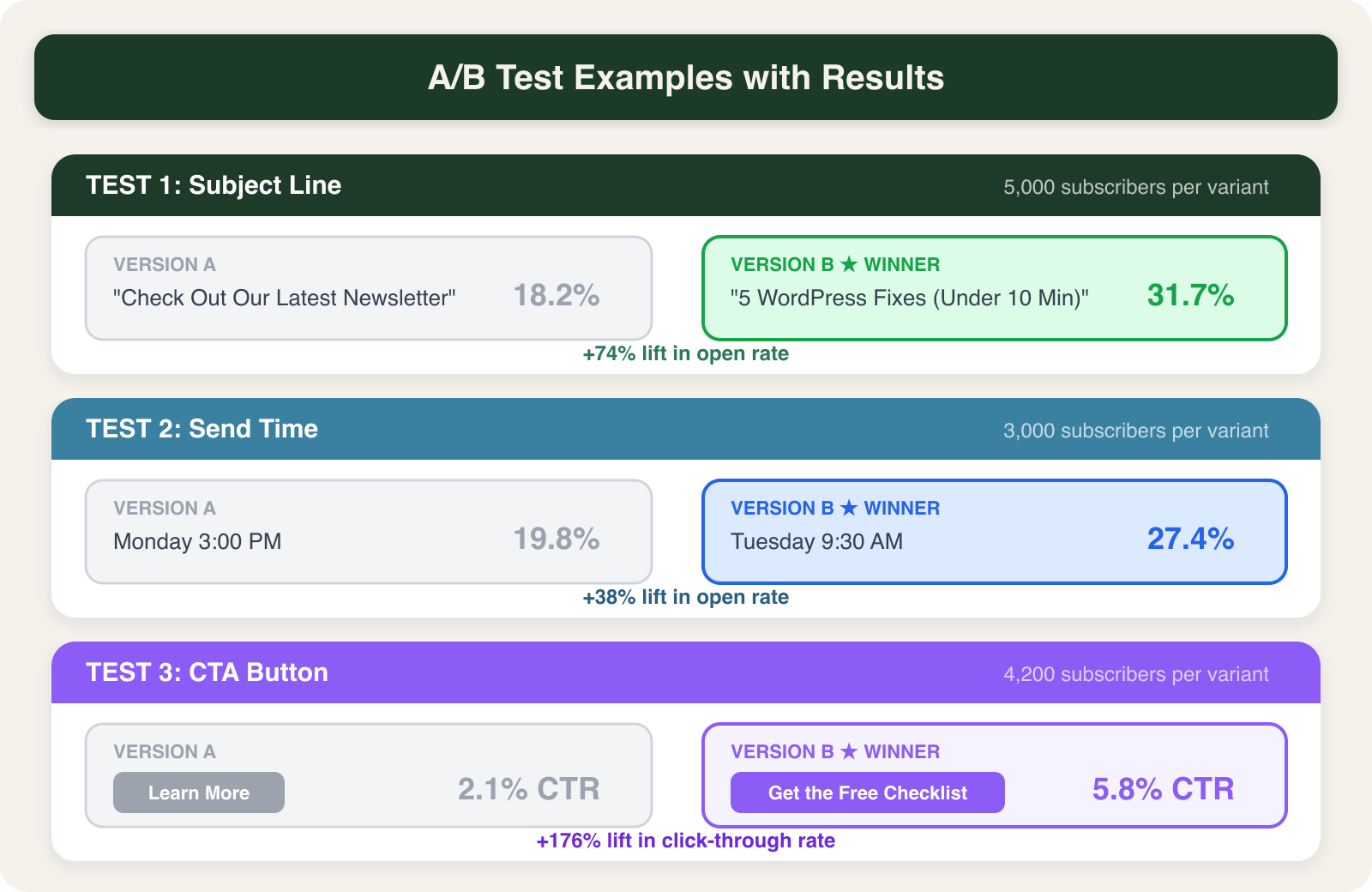
WordPress Fix: Mailchimp offers built-in A/B testing on subject lines, sender names, and send times. FluentCRM users can create two versions of a sequence email and compare results manually. Test one variable at a time with a minimum 1,000 subscribers per variation.
8. Poor Email Deliverability Setup
This is the most technical mistake and the most damaging. Without proper SPF, DKIM, and DMARC records, your emails land in spam folders regardless of content quality. I have seen open rates jump from 12% to 35% just by fixing DNS authentication records.
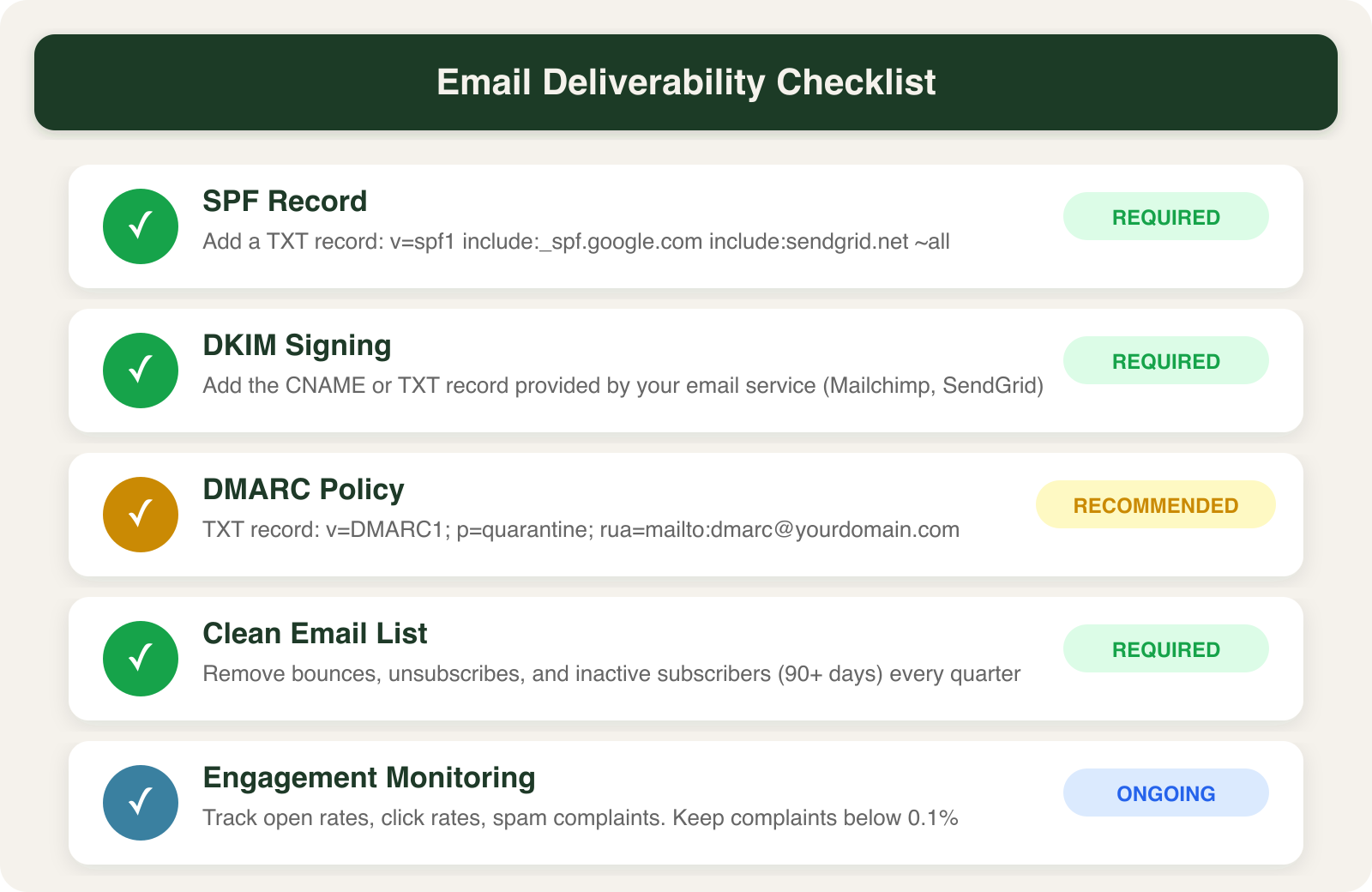
WordPress Fix: Your hosting provider or email service should provide SPF and DKIM records. Add them as TXT records in your domain’s DNS settings. Set up a DMARC record starting with v=DMARC1; p=none; rua=mailto:[email protected] to monitor authentication results. If this sounds overwhelming, SacWP’s WordPress management plans include full email deliverability setup.
9. Not Connecting WordPress Forms to Your Email Platform
I find this on at least half the WordPress sites I audit. The contact form plugin captures submissions, but those leads never reach the email marketing platform. They sit in a WordPress database table nobody checks.
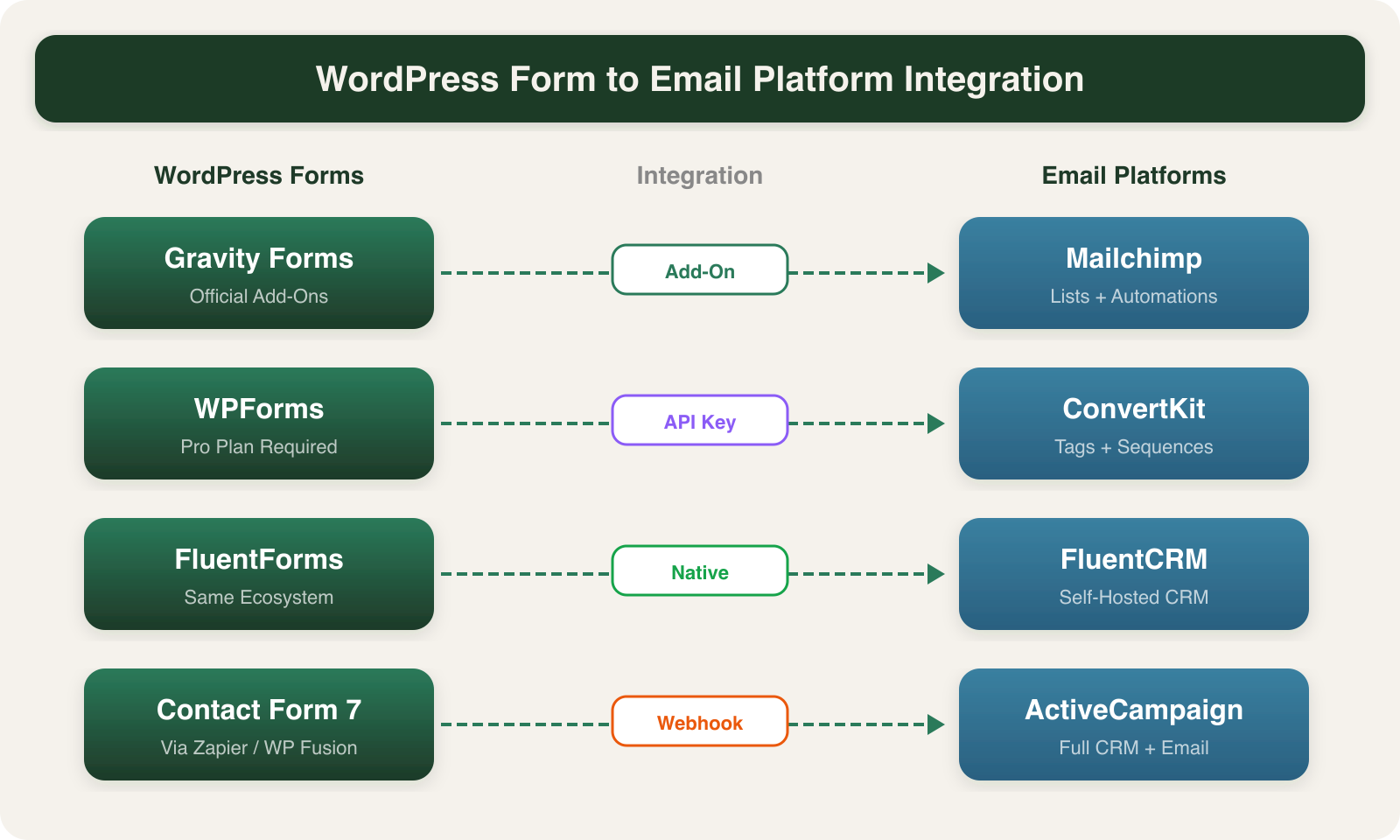
WordPress Fix: Every major form plugin offers direct integrations. Gravity Forms connects to Mailchimp, ConvertKit, and ActiveCampaign through official add-ons. WPForms includes Mailchimp and Drip integrations in their Pro plan. FluentForms connects natively to FluentCRM since they share the same developer ecosystem.
10. Ignoring Email Analytics
If you do not track open rates, click rates, and unsubscribe rates per campaign, you cannot improve. The numbers tell you exactly what is working.
WordPress Fix: FluentCRM includes a built-in analytics dashboard showing open rates, click rates, and revenue attribution. Mailchimp for WP users can view campaign reports directly in Mailchimp’s dashboard. Check your analytics weekly, not monthly. Trends become obvious faster when you review them consistently.
11. No Welcome Sequence
A subscriber who signs up and hears nothing for two weeks has already forgotten about you. Welcome emails generate 4x the open rate and 5x the click rate of regular campaigns according to Invesp research.
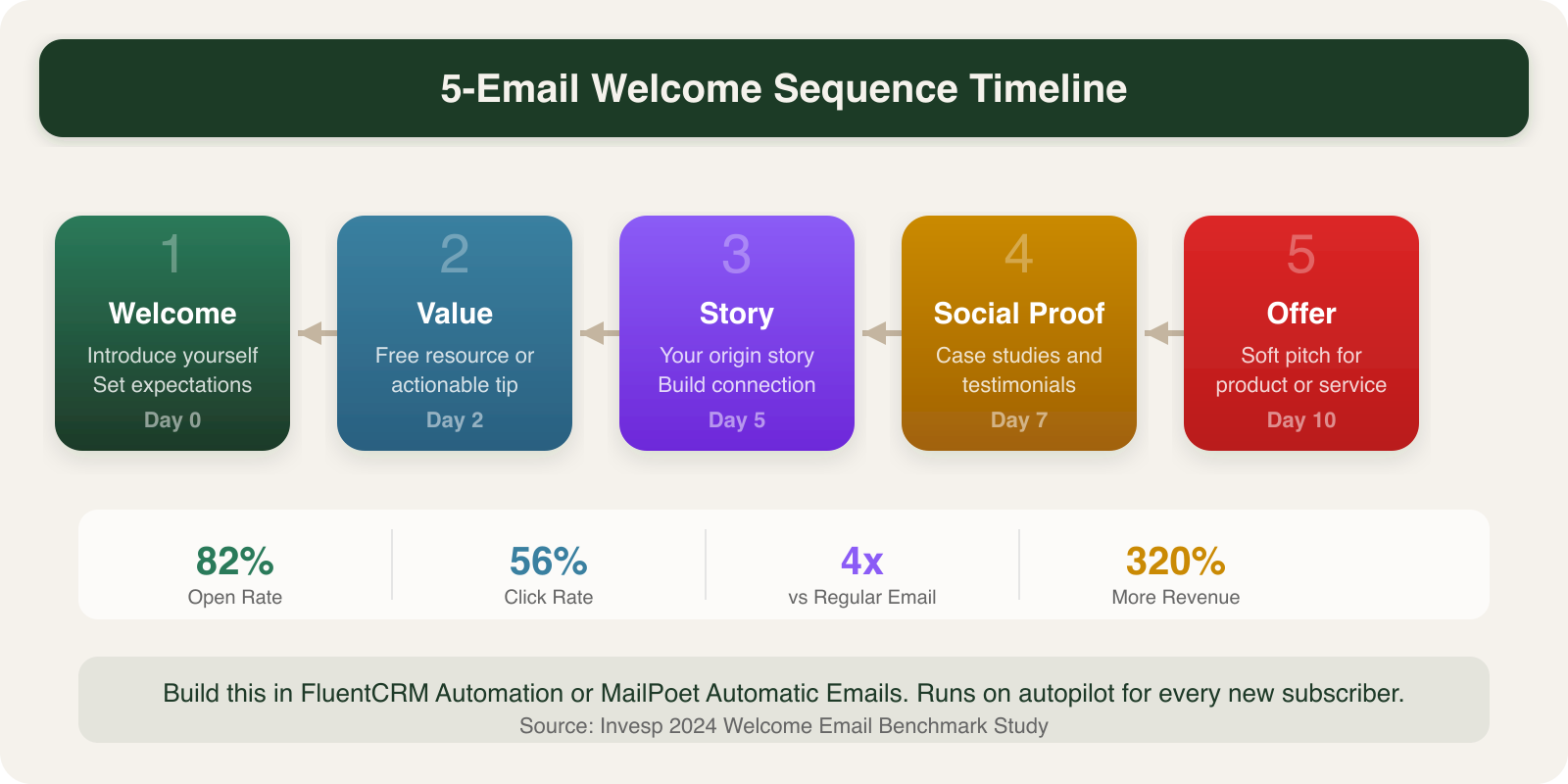
WordPress Fix: Build a 5-email welcome sequence in FluentCRM’s automation builder or MailPoet’s automatic emails feature. Space them 2 to 3 days apart: a welcome email, a value-packed resource, your origin story, social proof with testimonials, and a soft offer. I break down the full setup in my guide to email drip campaigns. This sequence runs on autopilot for every new subscriber.
12. Sending from noreply@
A noreply@ address tells subscribers you do not want to hear from them. It kills engagement and prevents replies that could turn into sales conversations. Emails from real addresses see 20 to 30% higher reply rates.
WordPress Fix: Set your from address to a real, monitored inbox like hello@ or michael@ in your email plugin settings. In FluentCRM, change it under Settings > Email Settings. Make sure someone actually reads and responds to replies.
13. Not Cleaning Your Email List
Dead subscribers drag down your sender reputation and inflate your costs. Every email platform charges based on subscriber count, so paying for 5,000 subscribers when only 2,000 are active wastes money and hurts deliverability.
WordPress Fix: Run a re-engagement campaign to inactive subscribers (no opens in 90 days). Give them 14 days to click a “Stay subscribed” link. Remove everyone who does not respond. In FluentCRM, use the Manage Subscribers filter to identify inactive contacts. Repeat this cleanup every quarter.
How These Mistakes Compound
None of these mistakes exist in isolation. A purchased list (Mistake 1) with no authentication (Mistake 8) and no welcome sequence (Mistake 11) creates a cascade: spam complaints trigger blacklisting, open rates crater, and the email platform eventually suspends your account.
Fix them in order of impact. Start with deliverability (Mistake 8), then build your welcome sequence (Mistake 11), then work through segmentation and testing.
Frequently Asked Questions
How often should I clean my WordPress email list?
Run a full list cleanup every 90 days. Remove hard bounces immediately after every campaign. Re-engage inactive subscribers (no opens in 90 days) with a targeted win-back sequence before removing them. A clean 2,000-person list outperforms a dirty 10,000-person list on every metric.
What is the best WordPress plugin for email marketing?
FluentCRM is the best self-hosted option because it stores subscriber data in your WordPress database, avoiding per-subscriber fees. For larger lists (10,000+), Mailchimp or ConvertKit with their WordPress plugins offer better deliverability infrastructure. The right choice depends on your list size and budget.
How do I fix email deliverability problems on WordPress?
Start with DNS authentication: add SPF, DKIM, and DMARC records for your sending domain. Then switch your WordPress site to send transactional emails through an SMTP service like WP Mail SMTP connected to SendGrid, Amazon SES, or Postmark. Default WordPress wp_mail() uses your server’s PHP mail function, which has terrible deliverability.
Do I need a separate email service or can WordPress handle it?
WordPress can handle email marketing through plugins like FluentCRM or MailPoet, but your hosting server should not be the one sending bulk emails. Use a dedicated sending service (SendGrid, Amazon SES, Mailgun) for deliverability. The WordPress plugin manages your list and content. The sending service handles delivery. This separation protects your domain reputation.
Getting email marketing right on WordPress takes the right plugin setup, proper DNS configuration, and a consistent sending strategy. If you want someone to handle the technical side, from deliverability setup to plugin configuration, get in touch with SacWP and I will get your email marketing running properly.