
I manage content for WordPress sites that publish 8-12 posts per month. The ones that track the right content marketing metrics grow organic traffic 2-4x faster than the ones that just publish and hope. I have seen this pattern across every site I manage: measurement drives improvement, guessing drives burnout.
The problem is not a lack of data. WordPress site owners drown in dashboards. The problem is tracking vanity metrics (social shares, raw pageviews) instead of the KPIs that connect content to revenue. Here are the 10 content marketing metrics that actually matter, how to track each one in WordPress, and the benchmarks I use to evaluate performance.
The Content Marketing Metrics Pyramid
Not all metrics carry equal weight. I organize content marketing metrics into three tiers.
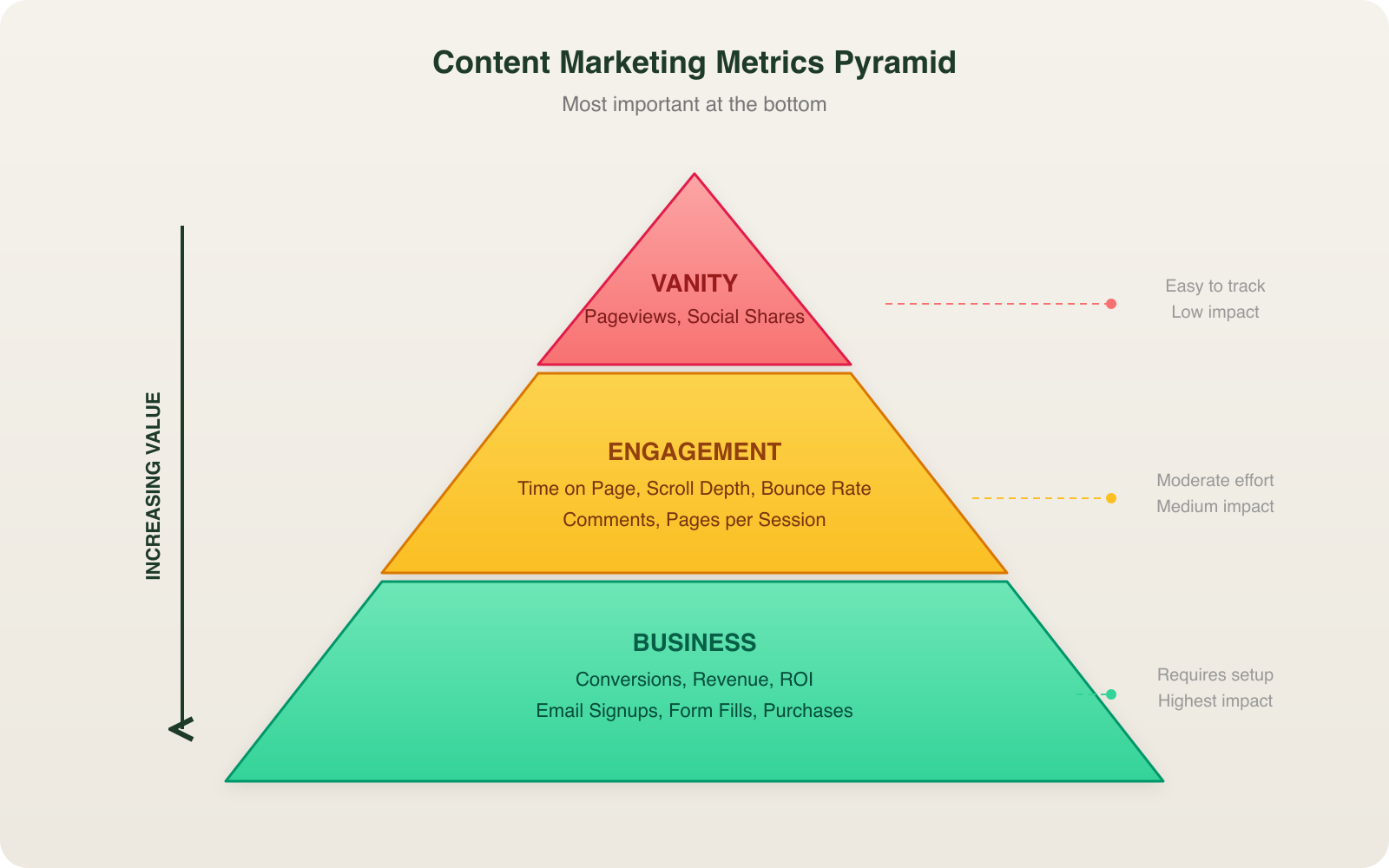
Vanity metrics (pageviews, social shares) tell you content exists. Engagement metrics (time on page, scroll depth, bounce rate) tell you content resonates. Business metrics (conversions, revenue, ROI) tell you content works. Start measuring from the bottom up.
Setting Up GA4 on WordPress
Every metric in this guide flows through Google Analytics 4. If your WordPress site still runs Universal Analytics (it stopped collecting data in July 2023), you are flying blind.
I install GA4 on WordPress sites using one of two methods:
- Site Kit by Google (free plugin, 3M+ active installs). Connects GA4, Search Console, and PageSpeed Insights in one dashboard inside WordPress.
- Google Tag Manager container injected via a lightweight plugin like Insert Headers and Footers. Better for sites that need custom event tracking.
Setup takes 10 minutes. Connect your Google account, select your GA4 property, and the tracking code deploys site-wide. No theme file editing required.
Traffic Metrics (KPIs 1-3)
1. Organic Sessions
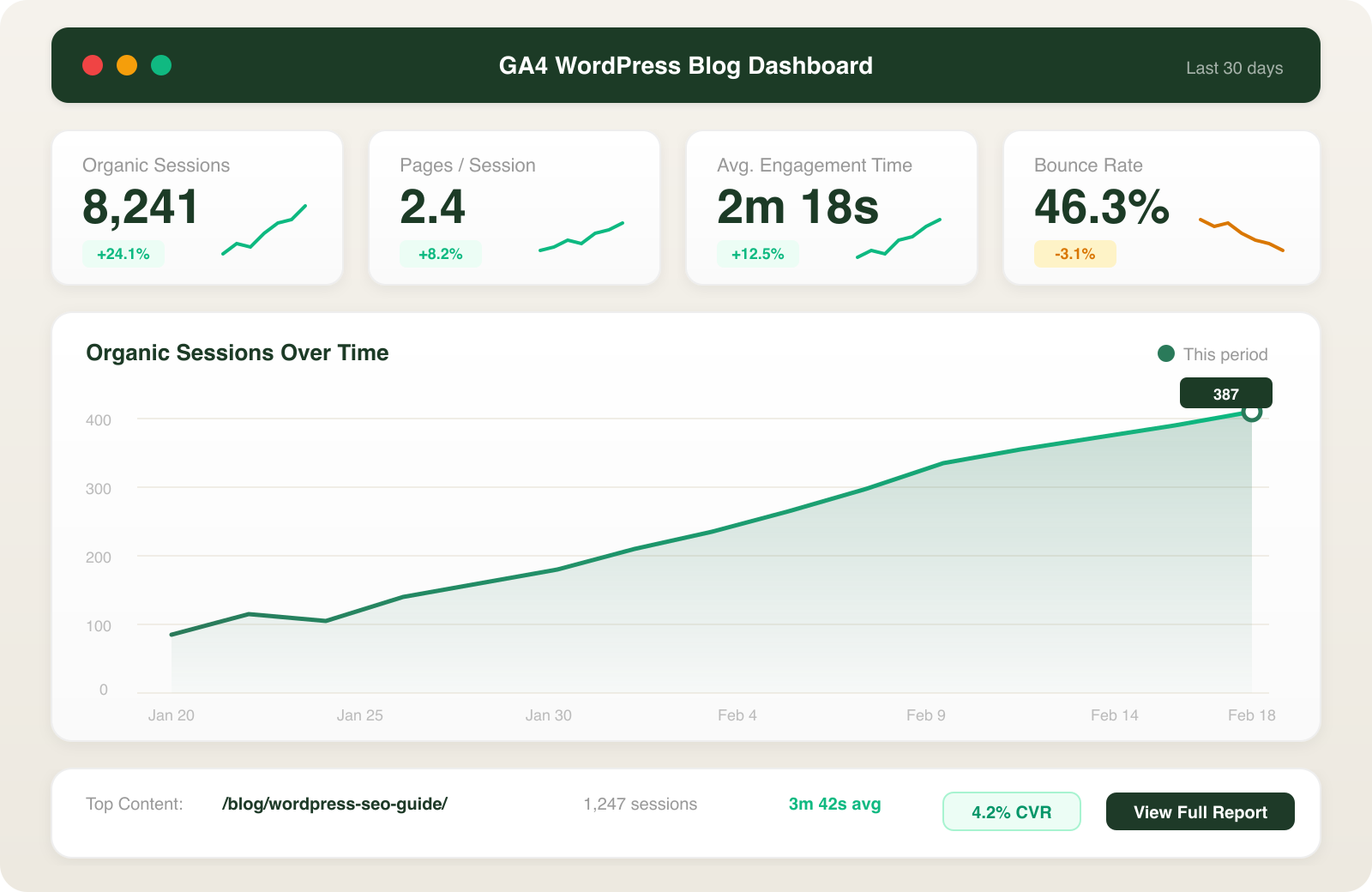
Organic sessions measure how many visits come from search engines. This is the north star for content marketing because organic traffic compounds. A blog post published today can generate traffic for years.
Benchmark: WordPress blogs publishing 2-4 posts per week see median organic traffic growth of 45% year-over-year, according to HubSpot’s 2024 State of Marketing report.
Where to track: GA4 > Reports > Acquisition > Traffic Acquisition. Filter by “Organic Search” in the Session default channel group.
2. New vs. Returning Users
New users tell you content is reaching fresh audiences. Returning users tell you content is building loyalty. I target a 70/30 split (new/returning) for content-focused WordPress sites.
Where to track: GA4 > Reports > Retention > Overview.
3. Top Landing Pages by Organic Traffic
This metric tells you which blog posts actually earn traffic from Google. I check this weekly. Posts that rank in the top 10 landing pages get updated and interlinked. Posts that never appear get audited for keyword targeting issues, often starting with the blog keywords guide to verify search intent alignment.
Where to track: GA4 > Reports > Engagement > Landing Page. Filter by organic traffic source.
Engagement Metrics (KPIs 4-6)
4. Average Engagement Time
GA4 replaced “time on page” with average engagement time, which only counts time when the page is in the active browser tab. This is a more honest metric. For WordPress blog posts, I target 2+ minutes of engagement time. Anything under 45 seconds signals a content quality or search intent mismatch.
Where to track: GA4 > Reports > Engagement > Pages and Screens.
5. Scroll Depth
Scroll depth tells you how far readers actually get through your content. GA4 fires a built-in scroll event at 90% by default. For more granular tracking (25%, 50%, 75%, 90%), configure custom scroll events through Google Tag Manager.
Benchmark: I expect 60-70% of readers to reach the 50% mark on a well-structured blog post. If fewer than 40% hit 50%, the intro or content structure needs work.
6. Bounce Rate
GA4 redefined bounce rate as the percentage of sessions that were not engaged (lasted less than 10 seconds, had no conversion event, and had fewer than 2 pageviews). A healthy WordPress blog post bounce rate is 40-60%. Landing pages and service pages should aim for 30-50%.
A content strategy built around topic clusters naturally reduces bounce rate because readers find related content to explore.
Conversion Metrics (KPIs 7-9)
This is where content marketing metrics connect to revenue. Traffic without conversions is a vanity metric.
7. Goal Completions (Form Fills, Email Signups)
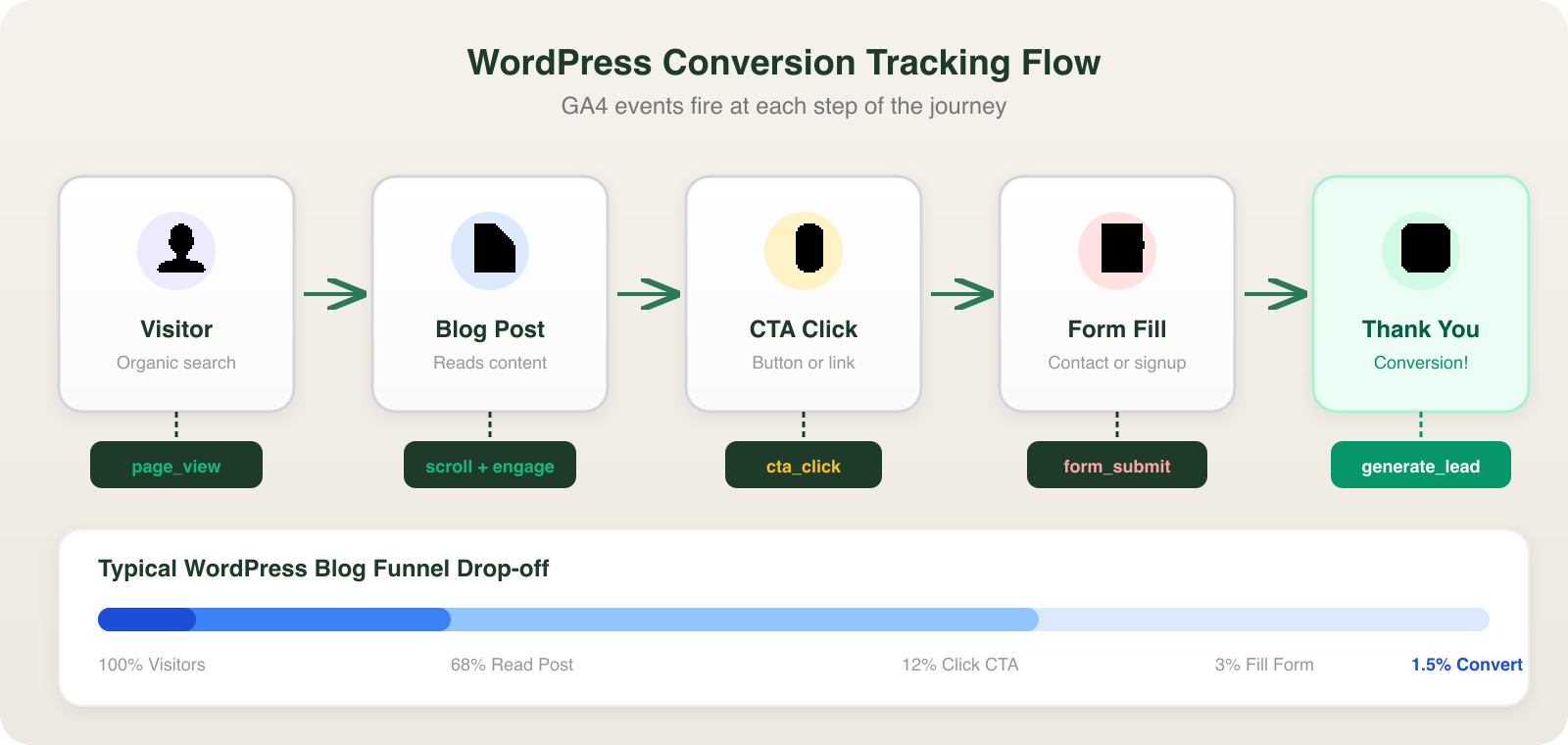
Every WordPress site I manage has at least one trackable conversion: a contact form submission, email newsletter signup, or quote request. I configure these as GA4 conversion events using one of two methods:
- WPForms or Gravity Forms with the GA4 event tracking add-on
- Google Tag Manager triggers that fire on form submission or thank-you page loads
WordPress makes this straightforward. The Thank You page redirect method is the most reliable: set your form to redirect to /thank-you/ after submission, then mark the page_view event for that URL as a conversion in GA4.
8. Conversion Rate by Content Type
Not all content converts equally. I track conversion rates separately for blog posts, landing pages, case studies, and resource downloads.
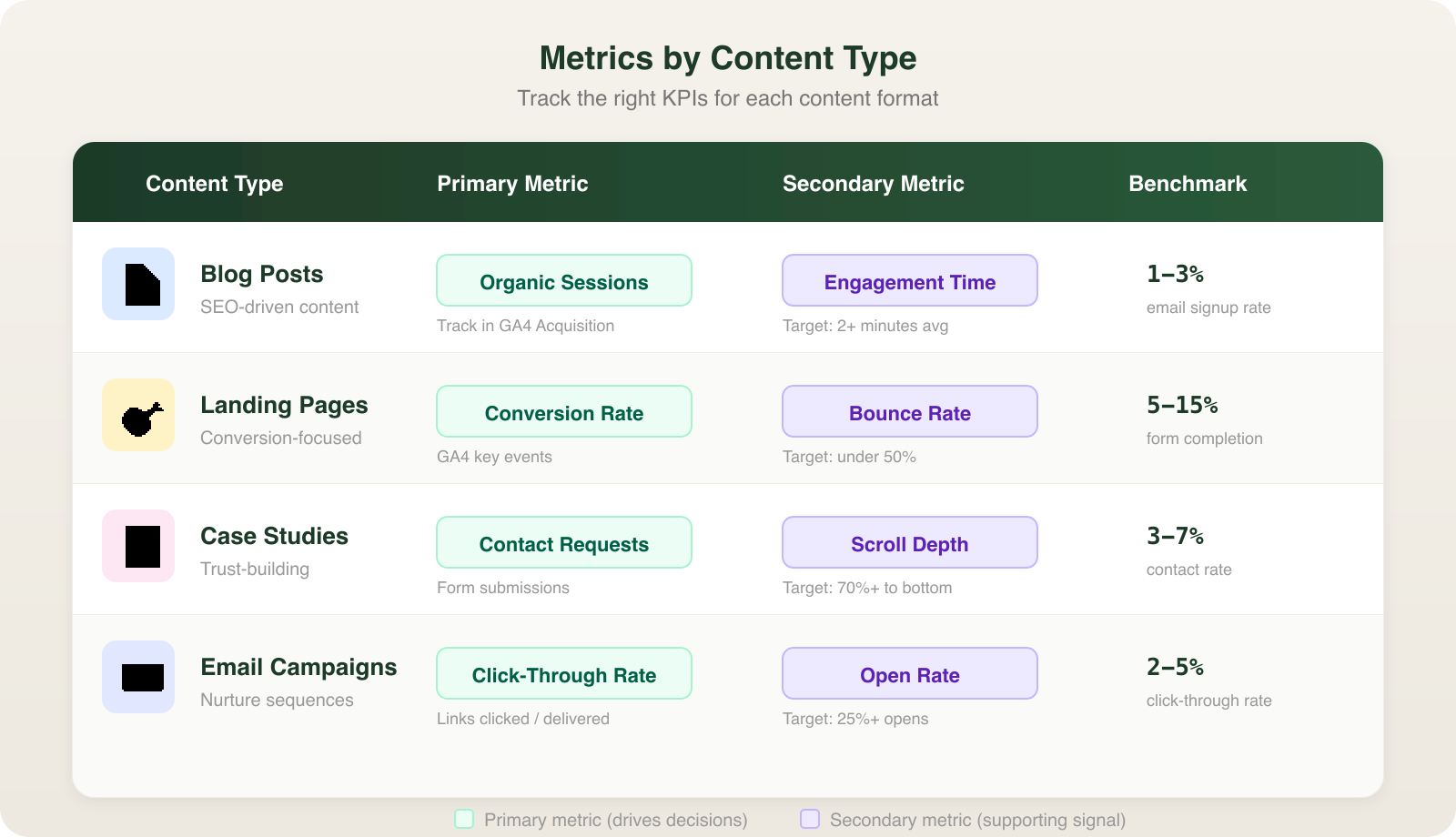
Benchmarks I use:
- Blog posts: 1-3% conversion rate (email signup or CTA click)
- Landing pages: 5-15% conversion rate
- Case studies: 3-7% conversion rate (contact form)
9. Email List Growth Rate
For WordPress sites running email marketing (and every business site should), I track monthly email list growth rate as a content marketing metric. The formula is simple: (New subscribers – Unsubscribes) / Total list size x 100.
A healthy WordPress blog should add subscribers at 2-5% monthly growth rate. I use plugins like MailPoet or Mailchimp for WordPress to embed signup forms in blog posts, exit-intent popups, and sidebar widgets.
The ROI Metric (KPI 10)
10. Content Marketing ROI
This is the metric that justifies your content budget to stakeholders. The formula is straightforward.
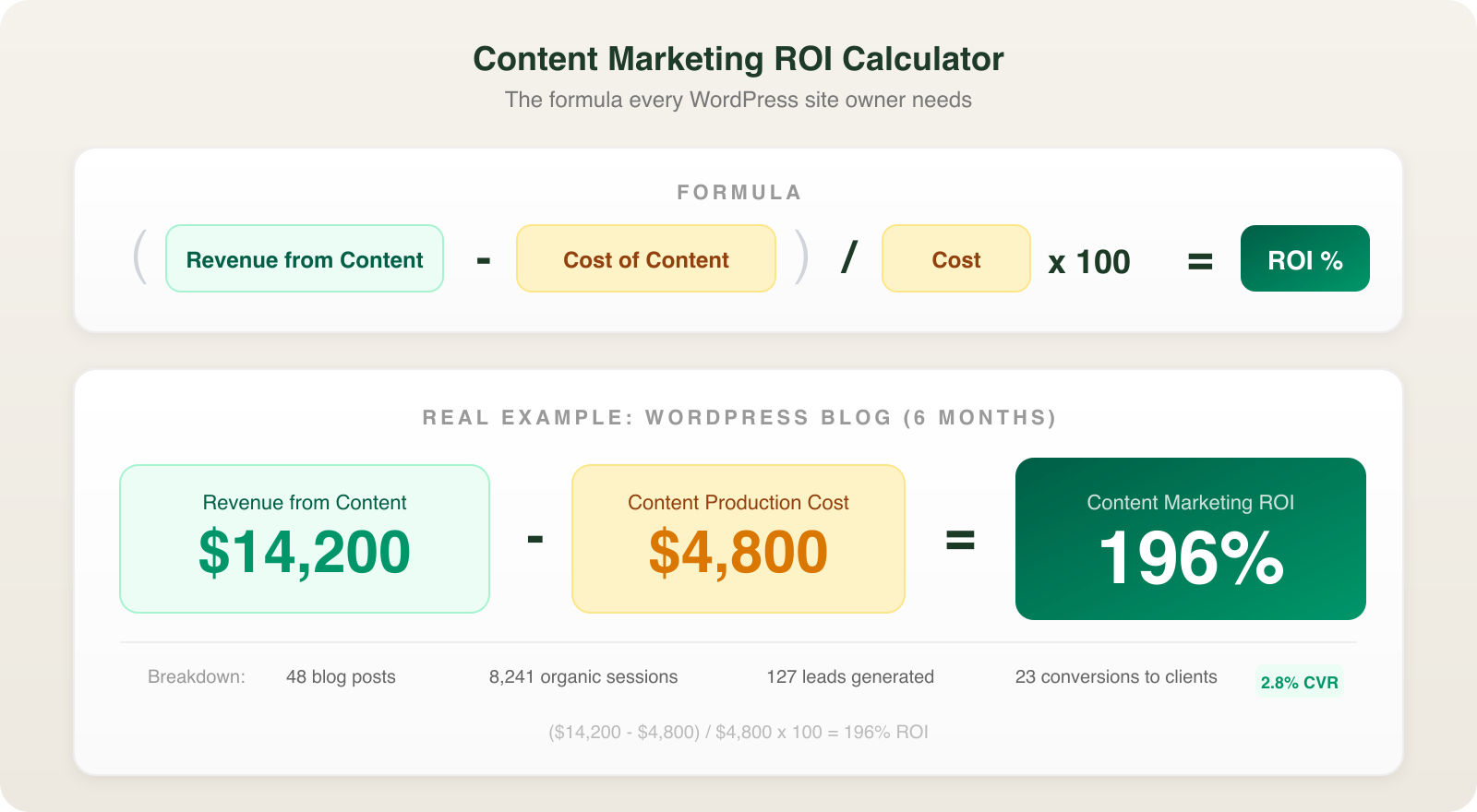
Here is a real example from a WordPress site I manage: the blog generated $14,200 in attributable revenue over 6 months. Content production costs (writing, images, SEO tools) totaled $4,800. ROI = ($14,200 – $4,800) / $4,800 x 100 = 196% ROI.
To track revenue attribution in WordPress, I use UTM parameters on CTAs within blog posts and track the full journey in GA4’s conversion paths report. For e-commerce sites running WooCommerce, GA4’s built-in e-commerce tracking connects content directly to purchase revenue.
SEO Metrics from Google Search Console
GA4 handles on-site metrics. Google Search Console handles search performance metrics that round out your content marketing measurement.
Impressions and Clicks: How often your content appears in search results and how often searchers click through. I check this weekly for every WordPress site I manage.
Average Position: Track keyword rankings over time. A post moving from position 18 to position 8 over three months tells you the content strategy is working, even if traffic has not spiked yet.
Click-Through Rate (CTR): Average organic CTR across all positions is 1.8% according to Advanced Web Ranking data. Posts in position 1 average 39.8% CTR. If your post ranks in the top 5 but has below-average CTR, rewrite the title tag and meta description.
A proper WordPress SEO strategy ties Search Console data to on-site engagement metrics for a complete picture.
WordPress Plugins for Content Marketing Metrics
You do not need expensive enterprise tools. These WordPress plugins cover 90% of measurement needs:
- Site Kit by Google (free): GA4 + Search Console + PageSpeed in one dashboard
- RankMath Analytics (free/pro): Keyword tracking, content performance scores, built-in Search Console integration
- MonsterInsights ($99/yr): GA4 dashboard inside WordPress with e-commerce and form tracking
- WPForms (free/pro): Form analytics with conversion tracking built in
- Pretty Links (free/pro): Click tracking on internal and affiliate links
For sites publishing 4+ posts per week, I recommend MonsterInsights Pro or RankMath Pro for the dashboard integration. Switching between WordPress admin and GA4’s interface burns time that should go toward creating content. If you need a system for turning these numbers into action, a content strategy framework ties measurement directly to your editorial calendar.
Building a Monthly Metrics Report
I pull a content marketing metrics report on the first of every month for every WordPress site I manage. The report takes 20 minutes and covers:
- Traffic: Organic sessions vs. previous month and YoY
- Top 5 posts by organic traffic with engagement time
- Conversion count by type (forms, signups, purchases)
- Search Console highlights: New ranking keywords, position changes
- Content ROI for the month (revenue attributed to content vs. production costs)
This report drives every content decision for the next month. Posts that perform get sequels and updates. Posts that underperform get audited or updated with fresh targeting. Keyword gaps get new content assigned. Data replaces guessing.
FAQ
How often should I check content marketing metrics?
I check traffic and engagement metrics weekly in GA4 and do a full metrics review monthly. Checking daily leads to reactive decisions based on normal traffic fluctuation. Weekly reviews catch real trends. Monthly reports drive strategy changes.
Which free WordPress plugin is best for tracking content marketing metrics?
Site Kit by Google is the strongest free option. It combines GA4, Search Console, and PageSpeed Insights data inside your WordPress dashboard. Pair it with the free version of RankMath for keyword tracking and on-page SEO scoring.
What is a good bounce rate for WordPress blog posts?
In GA4’s redefined bounce rate (sessions under 10 seconds with no engagement), a healthy WordPress blog post should land between 40-60%. If your bounce rate is above 70%, check that your content matches the search intent of your target keyword and that your page loads in under 3 seconds.
How do I calculate ROI for content marketing?
Use this formula: (Revenue attributed to content – Content production costs) / Content production costs x 100. Track revenue attribution using UTM parameters on blog CTAs and GA4 conversion paths. For a WordPress site producing 8 blog posts per month at $600/month total cost that generates $2,400 in attributable leads, the ROI is 300%.
Tracking the right content marketing metrics turns your WordPress blog from a cost center into a growth engine. If you want help setting up GA4, configuring conversion tracking, or building a measurement framework for your WordPress site, get in touch. I set up content analytics for WordPress sites across Sacramento and can have your tracking live within a week.