
I have audited over 60 WordPress sites where the blog had 50+ published posts and fewer than 800 monthly organic visits. The problem was never the writing quality or the keyword targeting. The problem was structure. Every post existed as an island, unconnected to any central topic. Google could not figure out what the site was actually about. Content clusters fix that problem by organizing your WordPress posts into tight, interlinked groups that signal topical authority to search engines.
One Sacramento HVAC company I worked with had 45 blog posts covering everything from “how to change a furnace filter” to “best thermostat settings for summer.” After restructuring those posts into three content clusters around heating, cooling, and indoor air quality, their organic traffic grew 147% in five months. The content itself barely changed. The structure did all the heavy lifting.
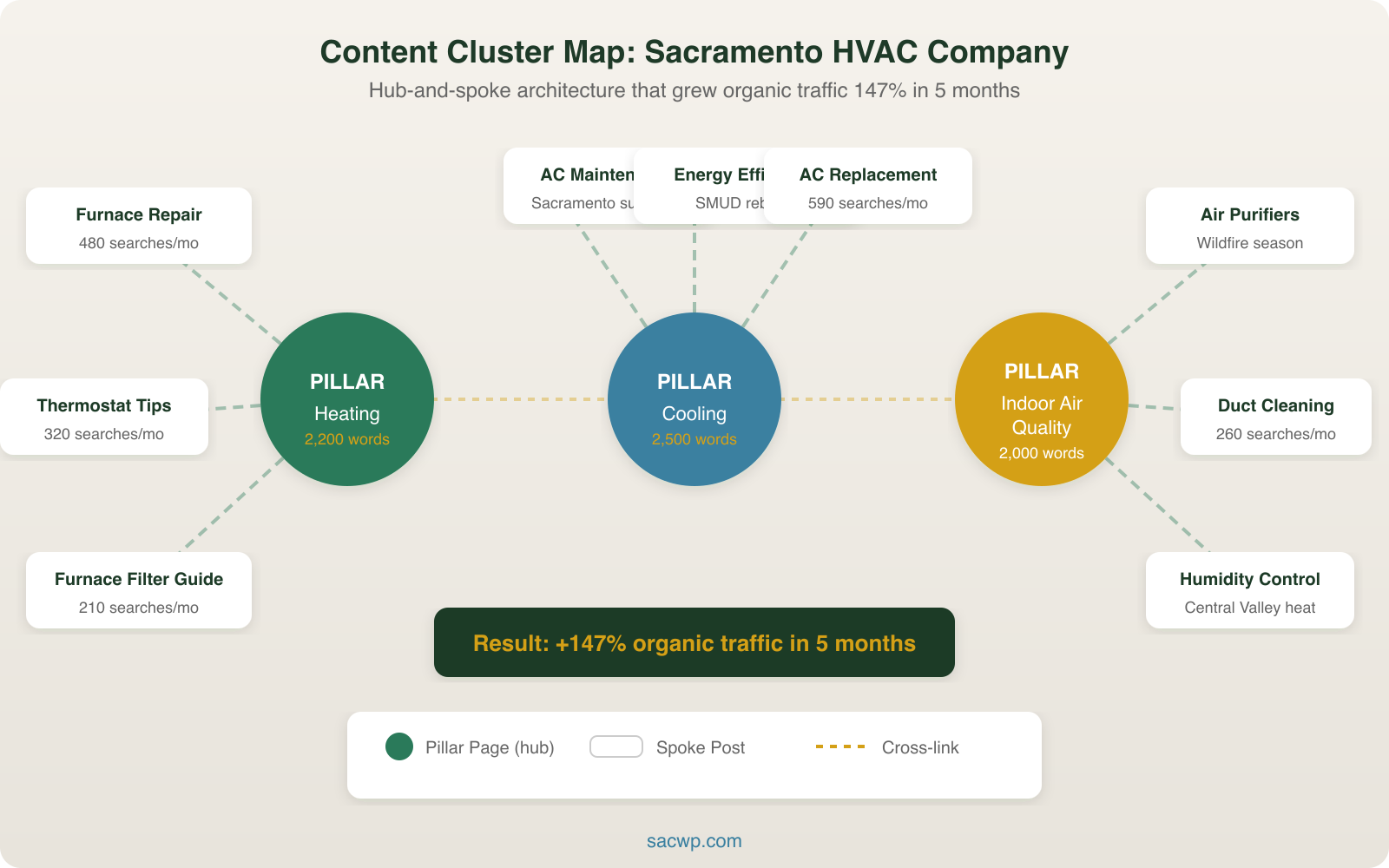
What Content Clusters Actually Are
A content cluster is a group of related pages organized around a single core topic. The structure has three components:
- Pillar page: A comprehensive, 2,000+ word guide covering the broad topic. This is your cluster’s hub.
- Cluster content: Individual blog posts that go deep on specific subtopics within the pillar’s scope. Each post targets a long-tail keyword related to the pillar topic.
- Internal links: Every cluster post links to the pillar page, and the pillar page links out to every cluster post. This creates a web of topical relevance that Google can crawl and understand.
HubSpot’s research across 6,000+ blog posts found that content organized in clusters generated 3x more page views and ranked for twice as many keywords as standalone posts covering the same topics. The reason is straightforward: Google’s algorithms evaluate topical depth, not just individual page quality. A single post about “email marketing” competes against sites that have 30 interlinked posts on the subject. Content clusters let you compete at that level.
How WordPress Categories Map to Content Clusters
WordPress has a built-in taxonomy system that aligns perfectly with content clusters. Your categories become your cluster labels. Your category archive pages become proto-pillar pages. Your individual posts become cluster content.
Here is how I set up content clusters in WordPress for a typical business site:
Step 1: Define 4-6 core categories. Each category represents one content cluster. For a WordPress agency site, these could be SEO, Content Marketing, WordPress Development, Web Design, and Email Marketing. Keep the list tight. Sites with 15+ categories dilute their topical signals.
Step 2: Assign every post to exactly one category. WordPress allows multiple categories per post, but I never use more than one for SEO purposes. A post about “on-page SEO for blog content” goes in SEO, not in both SEO and Content Marketing. Clear category assignment gives Google a clean topical map.
Step 3: Create a pillar page for each category. This is a standalone page (not a post) that serves as the comprehensive hub for that cluster. I build pillar pages as WordPress pages, not posts, so they sit in the main navigation and carry more internal link equity.
Step 4: Interlink everything. Every cluster post links to its pillar page in the first two paragraphs. The pillar page links to every cluster post using keyword-rich anchor text. Cluster posts also link to each other where relevant. This is the step most WordPress sites skip, and it is the step that makes clusters work.
Building Your First Pillar Page in WordPress
A pillar page is not just a longer blog post. It is a structured overview that covers the full scope of a topic and directs readers to deeper content on each subtopic. The best pillar pages I have built follow this structure:
- Introduction (200 words): Define the topic, state why it matters, include the primary keyword in the first paragraph
- Section overviews (150-200 words each): Cover 6-8 subtopics at a summary level. Each section links to the corresponding cluster post for the deep dive.
- Visual elements: Include at least one diagram, chart, or infographic. Pages with custom visuals earn 2x more backlinks according to BuzzSumo’s 2024 content analysis.
- Call to action: End with a clear next step, whether that is a service page, a contact form, or a lead magnet download.
In WordPress, I build pillar pages using the block editor with a table of contents block at the top. RankMath’s table of contents block generates anchor links automatically and adds the proper schema markup for Google. The page template should be full-width with no sidebar to give the content maximum visual weight.
A real example: I built a content strategy framework pillar page that links to 8 supporting posts covering audience research, content audits, editorial calendars, and measurement. That pillar page now ranks on page 1 for its target keyword, and 5 of the 8 cluster posts rank in the top 20 for their respective terms. The cluster structure is what made that possible.
Internal Linking Architecture for Content Clusters
Internal linking is not optional in a content cluster strategy. It is the mechanism that transfers authority between pages and tells Google which topics your site covers in depth. I follow three rules for internal linking within clusters:
Rule 1: Every cluster post links to the pillar page within the first 300 words. The anchor text should include the pillar page’s target keyword or a close variation. “Our complete guide to WordPress blog SEO” works. “Click here” does not.
Rule 2: The pillar page links to every cluster post. I update the pillar page every time I publish a new cluster post. If your pillar page covers 8 subtopics but only links to 5 cluster posts, you are leaving authority on the table.
Rule 3: Cluster posts link to each other. A post about keyword research naturally links to a post about avoiding keyword research mistakes. These lateral links strengthen the entire cluster. I aim for 2-3 internal links per cluster post, with at least one linking to a sibling within the same cluster.
RankMath displays internal link counts in the WordPress post list screen. I use this to spot posts with zero or one internal link. Any post with fewer than two internal links gets updated immediately.
Setting Up Content Clusters with RankMath
RankMath provides several features that support content cluster management in WordPress:
Focus keyword tracking: Assign a focus keyword to every post and page. For a content cluster on “email marketing,” the pillar page targets “email marketing strategy” while cluster posts target long-tail terms like “email subject line formulas” and “drip campaign setup.” RankMath flags duplicate focus keywords so you avoid cannibalization within your own cluster.
Internal link suggestions: RankMath Pro analyzes your content and suggests internal links you are missing. I run the link suggestion tool after every batch of new posts. It catches connections I miss manually, especially across clusters where a post in the SEO cluster should link to a related post in the Content Marketing cluster.
Schema markup: Add Article schema to cluster posts and WebPage schema to pillar pages. RankMath handles this automatically based on your default settings. The schema tells Google exactly what type of content each page contains.
SEO score optimization: I aim for an 80+ RankMath score on every pillar page and 70+ on cluster posts. The scoring system checks heading structure, keyword density, meta description length, image alt text, and internal link count. All of these elements contribute to cluster performance.
Measuring Content Cluster Performance
You cannot improve what you do not measure. I track three metrics for every content cluster:
- Cluster organic traffic: Total organic sessions across all posts in the cluster plus the pillar page. I create a custom GA4 exploration filtered by the pages in each cluster. A healthy cluster shows month-over-month growth for the first 6-9 months after launch.
- Keyword coverage: How many keywords does the cluster rank for in total? I pull this from SEMrush’s Organic Research report filtered by the cluster’s URL paths. A mature cluster of 8-10 posts should rank for 200-400 unique keywords, most of them long-tail variations.
- Internal link equity flow: Google Search Console’s Links report shows which pages receive the most internal links. Your pillar pages should appear near the top of that list. If a cluster post has more internal links than its pillar page, your linking structure needs adjustment.
I review these metrics monthly and publish a new cluster post whenever I find a keyword gap within an existing cluster. The goal is not to publish more content overall. The goal is to fill holes in your existing clusters before starting new ones. A solid approach is to plan what to blog about based on cluster gaps rather than random topic ideas.
Common Content Cluster Mistakes
Mistake 1: Too many clusters at once. I see WordPress sites launch 8 clusters simultaneously and publish one post per cluster per month. That means each cluster takes a year to reach 12 posts. Start with 2-3 clusters and build them to 8-10 posts each before adding a new one. Depth wins over breadth.
Mistake 2: Weak pillar pages. A 600-word overview page does not function as a pillar. Your pillar page needs to be comprehensive enough that Google recognizes it as a topical authority page. Minimum 2,000 words with clear section headings and links to every cluster post.
Mistake 3: No cross-cluster linking. Clusters should not be completely isolated. A post in your SEO cluster that mentions content planning should link to a relevant post in your Content Marketing cluster. I include 1-2 cross-cluster links in each post alongside the 2-3 within-cluster links.
Mistake 4: Ignoring existing content. Before creating new cluster posts, audit what you already have. Most WordPress sites with 30+ posts can reorganize existing content into clusters by updating categories, adding internal links, and creating pillar pages. I saved one client four months of content production by restructuring their existing 42 posts into five clusters.
How many posts does a content cluster need?
A content cluster needs a minimum of 5 supporting posts plus a pillar page to start showing results. I have found that the performance inflection point hits between 8-10 cluster posts, where Google begins treating the cluster as a genuine topical authority signal. There is no upper limit, but diminishing returns set in around 15-20 posts per cluster for most business sites.
Do content clusters work for small WordPress sites?
Content clusters work for any WordPress site that publishes blog content, regardless of size. I have implemented content clusters on sites with as few as 15 total posts, organizing them into 2-3 tight clusters. The key is going deep on a few topics rather than publishing one post about 15 different subjects. A small site with two well-built clusters will outrank a large site with 100 unstructured posts.
Should I use WordPress tags or categories for content clusters?
Use categories, not tags. WordPress categories are hierarchical and carry more taxonomic weight in site architecture. Tags in WordPress are flat, non-hierarchical labels that add clutter without improving topical signals. I have removed tags entirely from several client sites and seen no negative impact on rankings. Categories give you clean URL structures (/blog/seo/post-title/) and Google-friendly breadcrumb paths when configured with RankMath.
How long before content clusters improve rankings?
Plan for 3-6 months of consistent effort. A single content cluster with a pillar page and 5 supporting posts typically starts showing ranking improvements within 8-12 weeks for long-tail keywords. The pillar page takes longer because it targets more competitive head terms. For the HVAC company I mentioned earlier, the pillar pages reached page 1 at the 5-month mark while cluster posts started ranking within 6 weeks.
Start Building Your First Content Cluster
If your WordPress blog has been publishing posts without a cluster strategy, you are leaving organic traffic on the table. Pick your strongest topic area, build a pillar page, and start connecting your existing posts with intentional internal links. The structure does not require new plugins or expensive tools. It requires a plan and the discipline to follow it.
I build content cluster strategies for WordPress sites across Sacramento and beyond. If you want a cluster architecture mapped to your specific keywords and business goals, get in touch and I will put together a plan.