
I have audited keyword strategies for over 100 WordPress sites. The same mistakes show up on almost every one. These are not edge cases. They are fundamental errors that prevent pages from ranking, waste content budgets, and leave traffic on the table for competitors.
Here are the 7 keyword research mistakes I see most often, ranked by how badly they damage your rankings, with WordPress-specific fixes for each one.
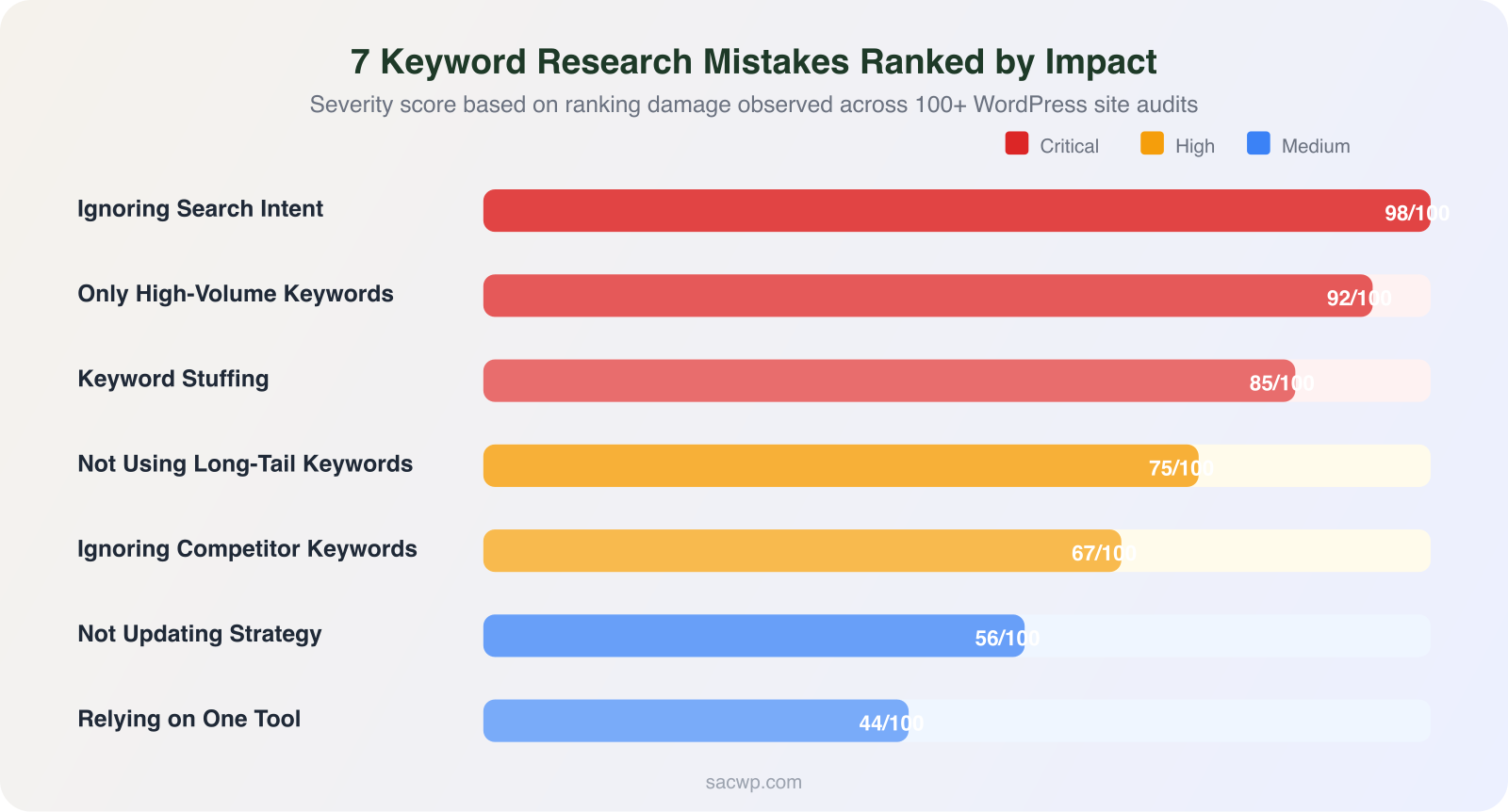
1. Targeting Only High-Volume Keywords
This is the most common keyword research mistake I encounter. A business owner types their core service into SEMrush, sees a keyword with 15,000 monthly searches, and decides that is the one to target. The keyword difficulty is 78. Their site has a domain authority of 12. They publish a blog post and wonder why it sits on page 7 for six months.
High-volume keywords are dominated by sites with thousands of backlinks, years of topical authority, and domain ratings above 60. Ahrefs data shows that 94.3% of all pages get zero traffic from Google. Most of those pages targeted keywords they had no realistic chance of ranking for.
WordPress Fix: Use SEMrush or Ubersuggest to filter keywords by difficulty score 0-35 and volume 100-2,500. This is the sweet spot for WordPress sites with fewer than 100 published posts. Install RankMath and set your focus keyword for every post. RankMath’s keyword difficulty indicator gives you a quick sanity check before you commit to writing.
2. Ignoring Search Intent
Keyword volume and difficulty tell you whether a keyword is worth targeting. Search intent tells you what kind of content to create. I have seen WordPress sites publish 2,000-word guides targeting keywords where Google only ranks product pages. That content will never rank because it does not match what the searcher wants.
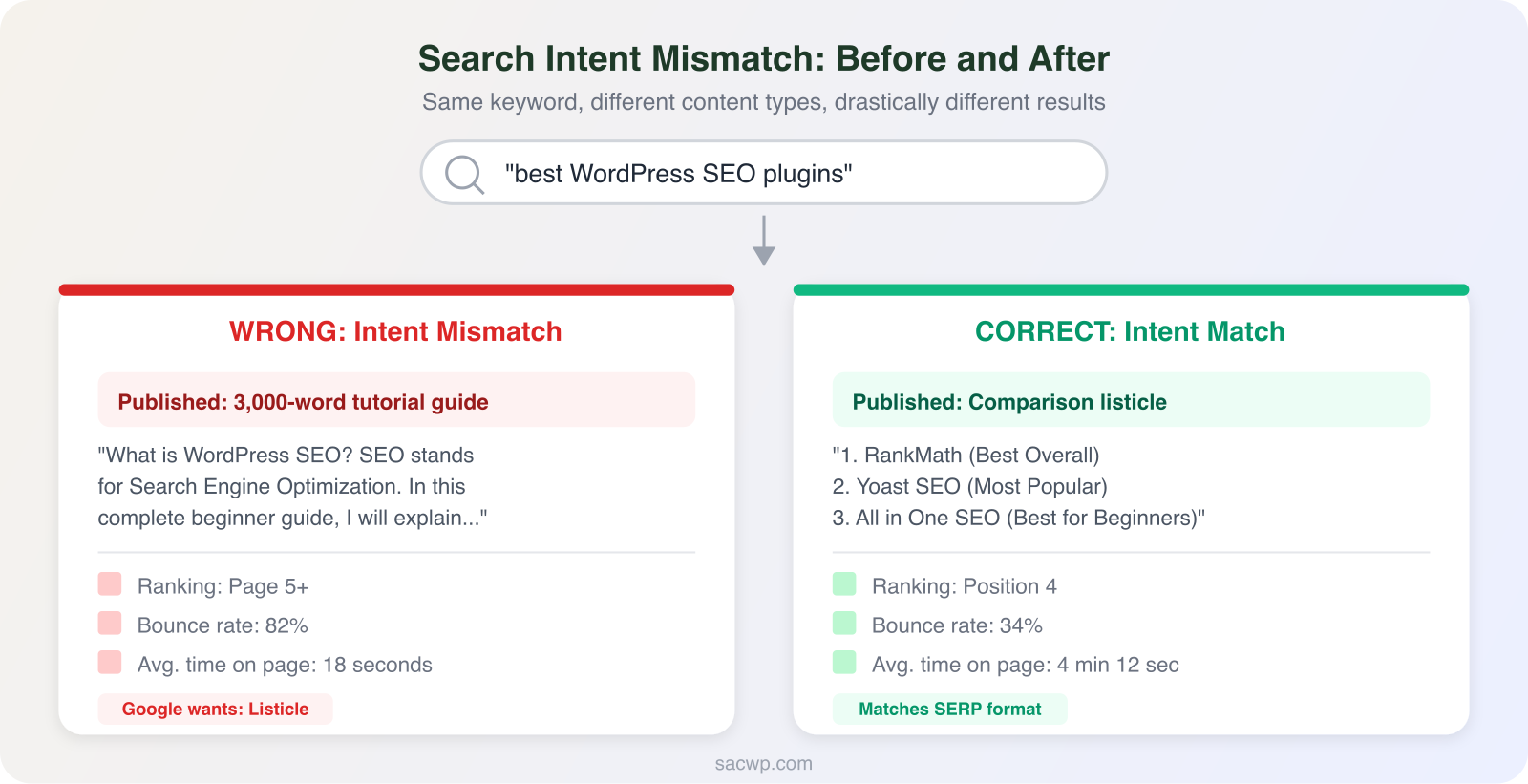
Search intent falls into four categories: informational (how-to, what-is), navigational (brand searches), commercial (comparisons, reviews), and transactional (buy, pricing). Google’s algorithm identifies intent with near-perfect accuracy. If the top 5 results for your keyword are all comparison posts, publishing a tutorial is fighting the algorithm.
WordPress Fix: Google your target keyword before writing a single word. Study the top 5 results. Note the content format (listicle, guide, comparison, landing page), word count, and heading structure. Match that format in your WordPress post. Use RankMath’s content analysis to confirm your post structure aligns with what ranks. I covered intent matching in depth in my blog keywords guide.
3. Keyword Stuffing
Keyword stuffing was an SEO strategy in 2010. In 2026, it is a ranking penalty. Google’s helpful content system detects unnatural keyword usage and demotes pages that prioritize search engines over readers. I still find WordPress sites with paragraphs that read like keyword soup.
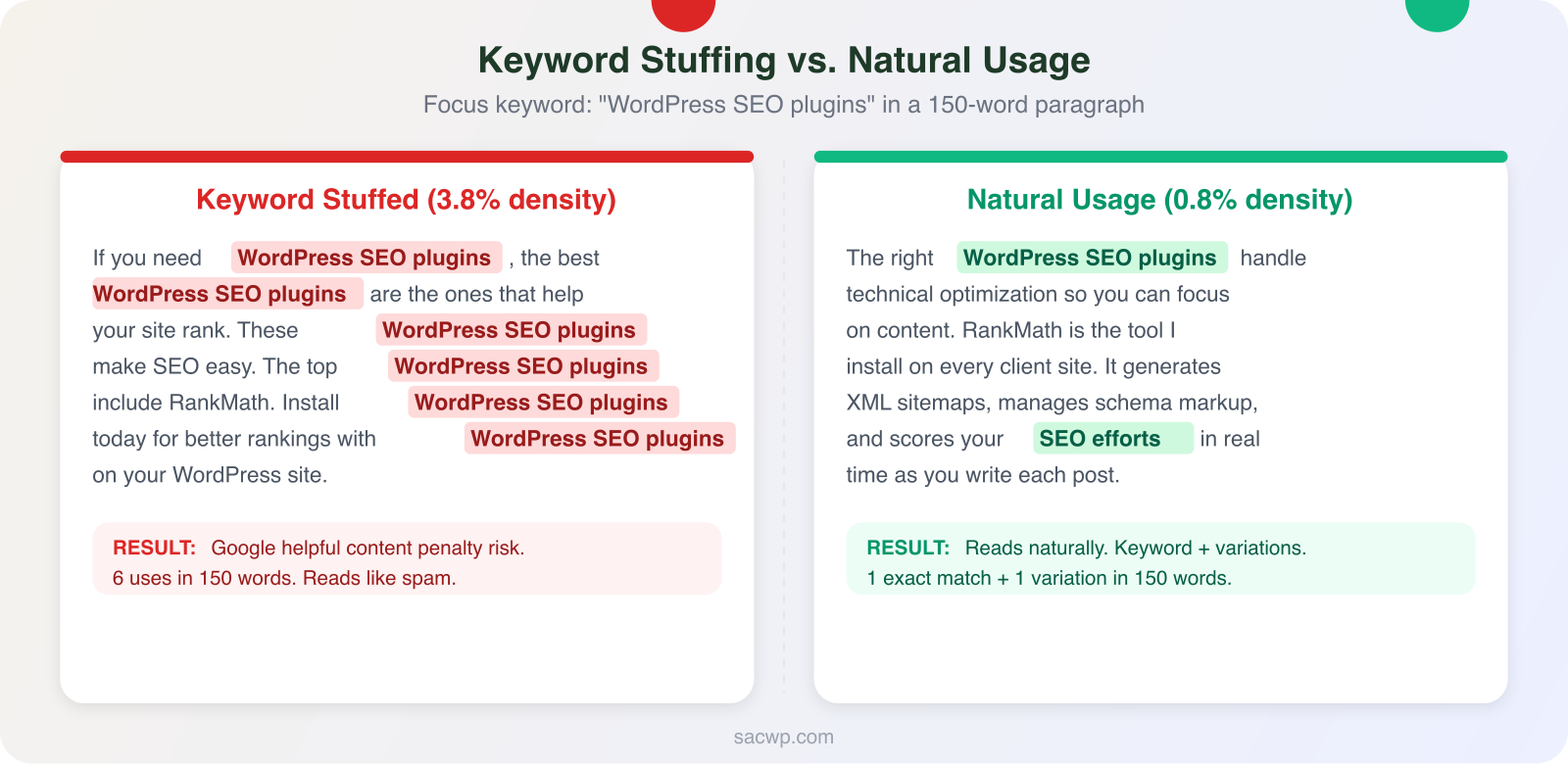
Studies from Surfer SEO show that top-ranking pages use their primary keyword 3-8 times in a 1,500-word post. That translates to a keyword density of roughly 0.5-1%. Anything above 2% triggers diminishing returns and risk.
WordPress Fix: Write for humans first. Writing headlines that get clicks starts with placing your focus keyword in the title, first paragraph, one H2 heading, and the meta description. Let variations appear naturally throughout the body. RankMath flags keyword density and will warn you if you overdo it. If RankMath says your density is too high, rewrite those sentences with synonyms and related phrases instead.
4. Not Using Long-Tail Keywords
Head terms like “SEO” (201,000 searches/month, KD 95) attract attention but not traffic. Long-tail keywords like “how to do SEO for a WordPress blog” (1,200 searches/month, KD 22) are where WordPress sites actually win. Ahrefs reports that 70% of all search queries contain four or more words.
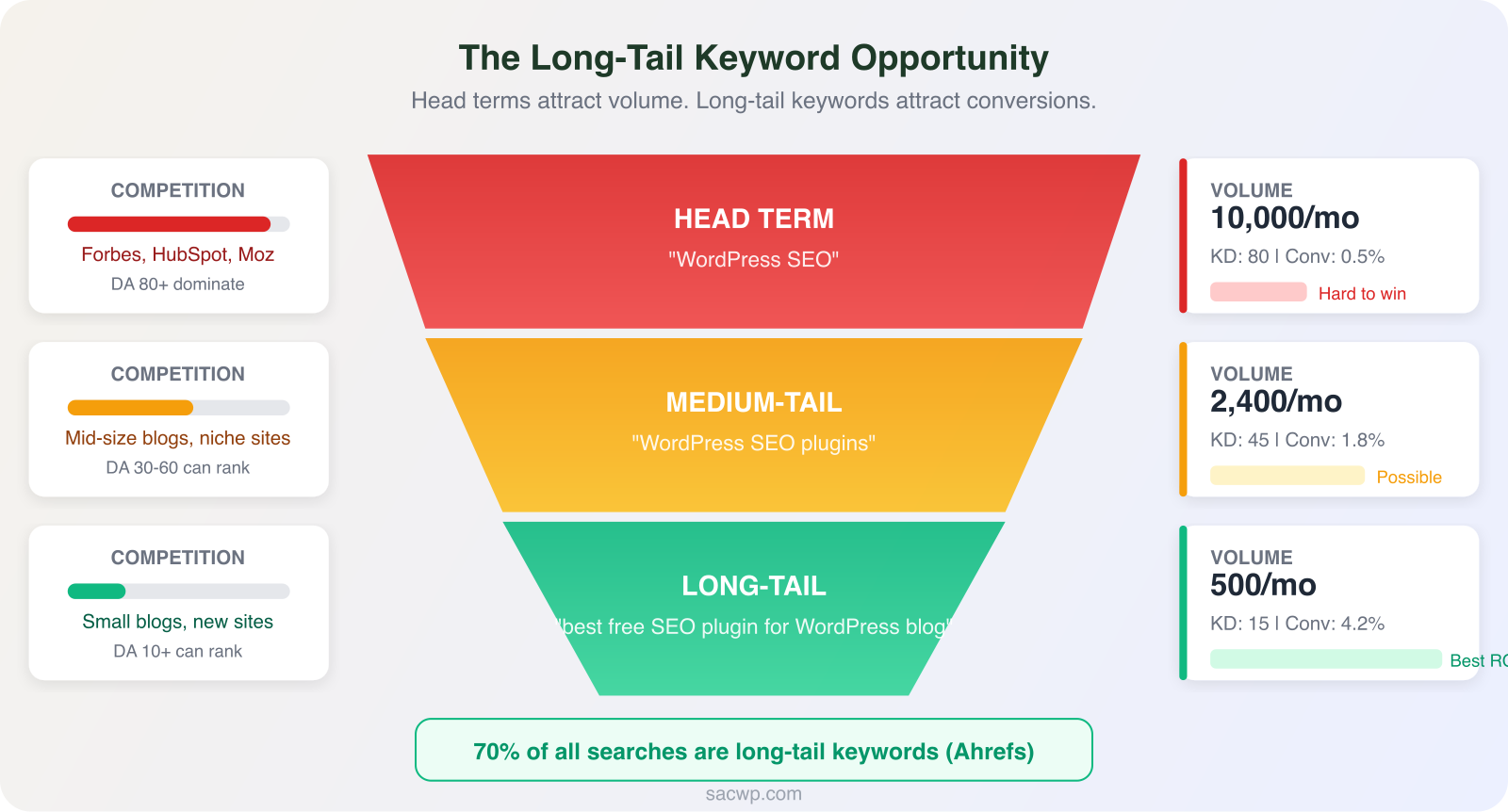
Long-tail keywords convert better because they capture specific intent. Someone searching “WordPress SEO” could want anything. Someone searching “how to optimize WordPress blog posts for Google” is ready to take action. That specificity means higher engagement, lower bounce rates, and more conversions.
WordPress Fix: For every head term you want to target, find 5-10 long-tail variations using Google autocomplete, People Also Ask, and SEMrush’s Keyword Magic Tool. Create individual posts for each long-tail keyword. Link them all to a comprehensive pillar post on the head term. This content strategy approach builds topical authority that eventually lets you compete for higher-difficulty terms.
5. Ignoring Competitor Keywords
Your competitors have already done keyword research. Their published content is a roadmap of validated keyword opportunities. I audit competitor keywords on every client project and consistently find 20-40 keywords the client has not targeted yet.
WordPress Fix: Enter three competitor URLs into SEMrush’s Keyword Gap tool. This shows keywords where competitors rank but you do not. Filter for keywords with difficulty under 40 and volume above 200. Export that list and prioritize keywords where at least two competitors rank in positions 5-20. Those are keywords where the competition is beatable and demand is proven.
6. Not Updating Keyword Strategy
Keyword research is not a one-time task. Search volumes shift seasonally. New competitors enter your space. Google algorithm updates change which content types rank. A keyword strategy from 12 months ago is operating on stale data.
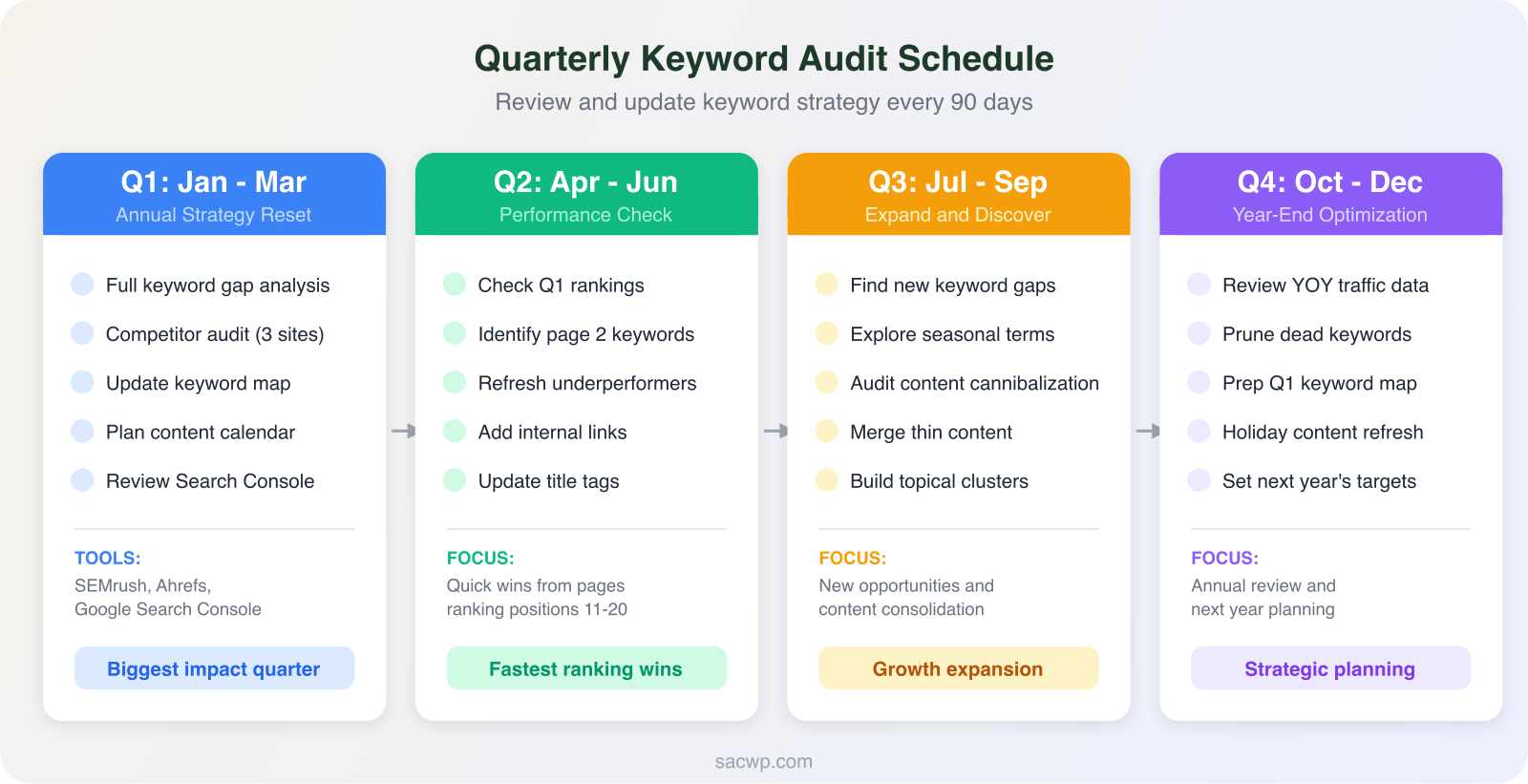
Google Trends data shows that 15% of daily searches have never been searched before. New keyword opportunities appear constantly. Sites that review their strategy quarterly capture these opportunities. Sites that set and forget their keywords watch rankings erode.
WordPress Fix: Set a quarterly keyword audit. Pull your top 50 pages from Google Search Console and check which keywords drive impressions but have low click-through rates. Those pages need title tag improvements or content refreshes. Identify any pages ranking on positions 11-20 (top of page 2) and give them priority updates. Add new internal links from recent posts to push those pages over the edge. A solid content strategy framework keeps your keyword research aligned with business goals instead of chasing random terms.
7. Relying Only on One Tool
Every keyword tool has blind spots. SEMrush pulls from a different data set than Ahrefs. Google Keyword Planner shows volume ranges, not exact numbers. Ubersuggest misses keywords that paid tools catch. Using a single tool means you are making decisions on incomplete data.
WordPress Fix: Use at least two keyword sources. I pair SEMrush (paid, comprehensive) with Google Search Console (free, shows your actual search queries). Google Search Console reveals keywords you already rank for that you did not intentionally target. Those are the easiest wins because Google has already validated your content for those terms. Combine tool data with manual SERP analysis for the complete picture.
FAQ
How many keywords should I target per WordPress blog post?
One primary keyword and 3-4 secondary keywords per post. The primary keyword goes in your title, URL slug, first paragraph, and one H2. Secondary keywords support the primary keyword naturally in the body. RankMath lets you set up to 5 focus keywords per post, and I use all five slots on every piece I publish.
What is the fastest way to find keyword research mistakes on my site?
Open Google Search Console and go to Performance > Search Results. Sort by impressions descending. Pages with high impressions but low clicks have keyword or intent problems. Pages with zero impressions for their target keyword are either targeting something too competitive or have technical SEO issues preventing indexing.
Do I need paid keyword tools for WordPress SEO?
Paid tools give you more data, but you can start with free options. Google Keyword Planner, Google Search Console, and Google Trends cover the basics. Ubersuggest offers limited free searches daily. Once your site has 30+ published posts and you are ready to scale, investing in SEMrush or Ahrefs pays for itself within the first quarter through better keyword targeting. I wrote about improving your Google rankings with both free and paid approaches.
How long does it take to see results after fixing keyword mistakes?
Google typically re-crawls and re-evaluates updated content within 2-4 weeks. Ranking improvements from fixing keyword targeting appear within 30-90 days depending on your domain authority and the competition level. The fastest wins come from fixing intent mismatches and updating title tags on pages already ranking on page 2.
I build WordPress keyword strategies that drive real organic traffic. Every site I launch ships with a keyword map, RankMath configured for your target terms, and a content calendar built around winnable keywords. Get in touch to fix your keyword strategy and start ranking for the terms that matter.