
Small business content creation has a reputation problem. Every guide out there assumes you have a marketing team, a video editor, and four hours a day to write. The reality is different. You have 45 minutes between client calls, a WordPress site that needs updating, and zero budget for a content agency.
I build WordPress sites for small businesses, and the ones that grow their traffic share a pattern. They don’t publish the most content. They publish the right content, consistently, using systems that fit their actual schedule. Here’s how to do that.
Start With What Your Customers Already Ask
The fastest path to content that drives traffic is sitting in your inbox right now. Every question a customer emails you, every concern they raise on a sales call, every “how does this work?” is a blog post waiting to happen.
According to HubSpot’s 2025 State of Marketing report, 71% of consumers start their buying journey with a search engine query. Those queries are questions. If you answer them on your site before a competitor does, you win the click.
I tell every client to keep a running list. A Google Doc, a note on your phone, a sticky note on your monitor. When a customer asks something, write it down. After two weeks, you’ll have 10 to 15 blog post topics that you already know your audience cares about.
If you need a structured approach to picking topics, I wrote a full guide on what to blog about for your business that walks through the process step by step.
Build a Content Calendar You’ll Actually Follow
The number one reason small business content creation fails is ambition. Business owners plan to publish three posts a week, hit that pace for two weeks, then go silent for three months. Google notices the gap. Your audience notices it too.
A realistic publishing schedule beats an ambitious one every time. Research from Orbit Media’s annual blogging survey shows that bloggers who publish consistently (even just twice a month) see 2x the results of those who publish in bursts. Consistency signals to search engines that your site is active and worth crawling regularly.
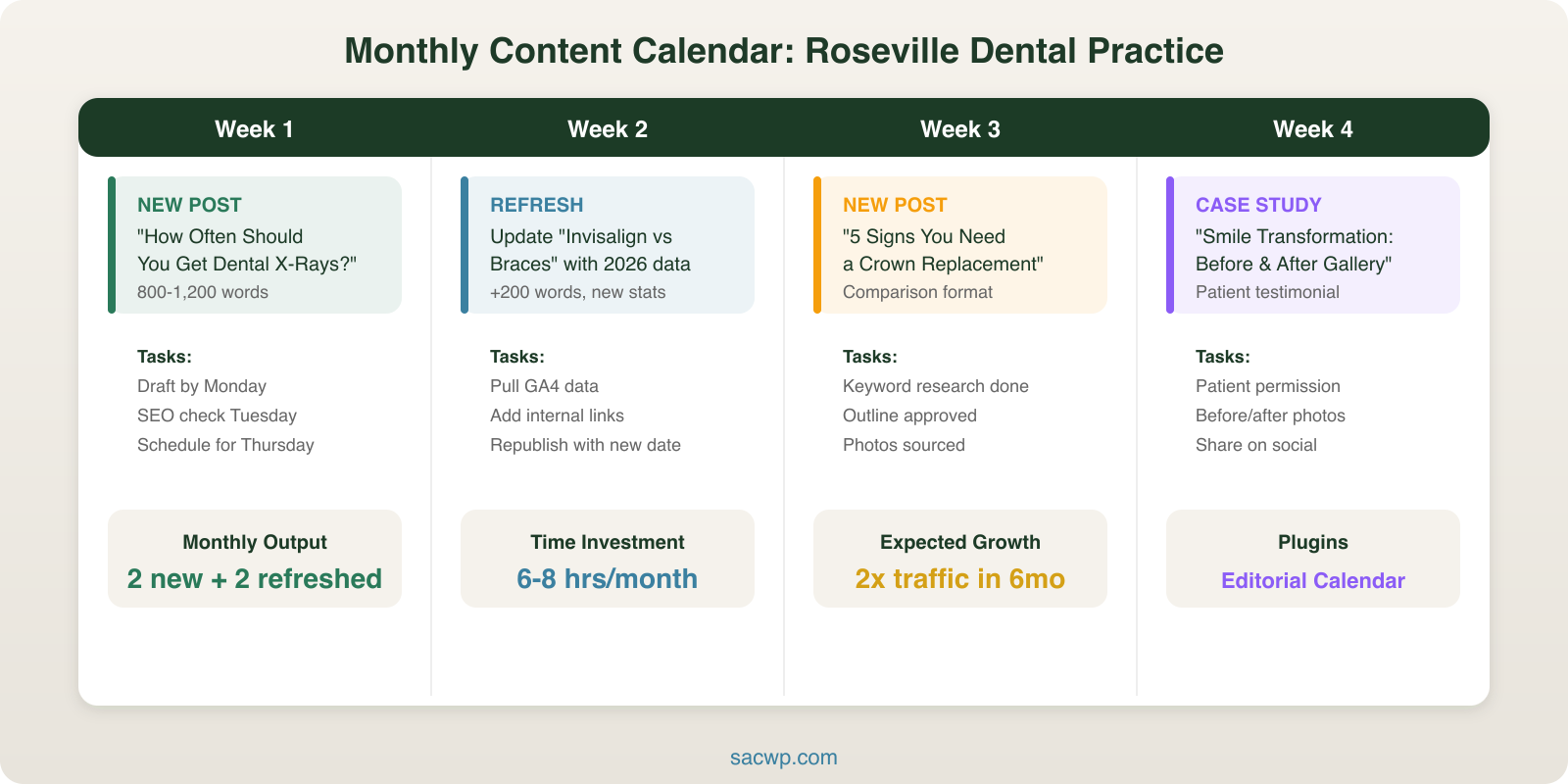
Here’s a content calendar that works for a one or two person operation:
- Week 1: Publish a how-to post answering a customer question (800 to 1,200 words)
- Week 2: Update an older post with fresh data or examples
- Week 3: Publish a list post or comparison relevant to your industry
- Week 4: Share a case study or project spotlight
That’s two new posts and two updates per month. WordPress makes this manageable with its built-in scheduling feature. Write a post on Sunday night, schedule it for Tuesday morning, and it publishes while you’re serving customers.
For a deeper dive into publishing frequency, check out how often small businesses should blog for benchmarks by industry.
Use WordPress to Eliminate Busywork
WordPress powers 43% of the web for a reason. It removes technical barriers so you can focus on writing. But most small business owners only scratch the surface of what WordPress can do for content creation.
Templates Save Hours Every Month
Create a reusable block pattern for your blog posts. Include your standard heading structure, a placeholder for your intro, subheading sections, and your closing CTA. Every new post starts from the same framework instead of a blank page. This alone cuts writing time by 20 to 30 minutes per post.
Schedule Everything in Advance
WordPress lets you set a future publish date on any post. I batch-write content on slower days (usually the first Monday of each month) and schedule posts across the following four weeks. The site stays active even during my busiest stretches.
Plugins That Pay for Themselves
A few plugins make content creation dramatically easier for small businesses:
- RankMath or Yoast SEO for real-time keyword optimization feedback as you write
- ShortPixel or Imagify for automatic image compression (page speed directly affects rankings)
- Editorial Calendar for a visual drag-and-drop publishing schedule
- Redirection to manage old URLs when you update or consolidate posts
These are all free or under $50/year. That’s less than a single hour of agency time.
Write for Humans First, Search Engines Second
Content creation for small business owners gets derailed when SEO becomes the whole focus. I’ve reviewed sites where every sentence is stuffed with keywords to the point of being unreadable. Google’s helpful content update in 2024 specifically penalizes this approach.
The formula is simple: write naturally, include your target keyword in the title and first paragraph, use related terms throughout, and structure your post with clear headings. That’s 90% of on-page SEO handled.
The remaining 10% is technical: meta descriptions under 160 characters, alt text on images, internal links to related posts on your site. WordPress SEO plugins handle the checklist for you.
What actually moves the needle is depth. A 1,000-word post that thoroughly answers a question outranks a 300-word post stuffed with keywords every time. According to Backlinko’s analysis of 11.8 million Google search results, the average first-page result contains 1,447 words.
Repurpose Everything You Create
Small businesses can’t afford to create content once and let it sit. Every blog post should become three to five pieces of additional content:
- Pull three quotes for social media posts. Drop them into Canva with your brand colors. That’s three days of social content from one article.
- Record yourself reading the key points. A two-minute video summary for Instagram Reels or TikTok takes less time than writing a caption.
- Turn a list post into an email newsletter. Your subscribers get value, and you drive traffic back to the full article.
- Combine three related posts into a downloadable guide. Offer it as a lead magnet to grow your email list.
This multiplier effect means one hour of writing produces a week of marketing content. For small business content creation, that efficiency is everything.
Measure What Matters (and Ignore the Rest)
Google Analytics and Google Search Console are free. Install both. Then focus on exactly three metrics:
- Organic traffic growth month over month. Is your content bringing in new visitors from search?
- Top-performing pages. Which posts drive the most traffic? Write more on those topics.
- Conversion actions. Phone calls, form submissions, email signups. Traffic without conversions is a vanity metric.
Skip bounce rate, time on page, and pages per session until you’re past 1,000 monthly visitors. Before that threshold, the sample size is too small to draw conclusions.
If you want a structured approach to tying content to business goals, my content strategy framework lays out the full measurement system.
When to Get Help
Content creation for small business works best when the business owner is involved. You know your customers, your industry, and your competitive advantages better than any outside writer. But “involved” doesn’t mean “doing everything alone.”
The tipping point usually comes around month six. You’ve built a publishing habit, you’re seeing traffic growth, and you realize that scaling from two posts a month to four would accelerate results significantly. That’s when bringing in professional support makes sense.
At SacWP, I help small businesses build WordPress content systems that run efficiently. Whether that’s setting up your editorial workflow, optimizing existing posts for search, or handling the technical SEO so you can focus on writing, the goal is always the same: more traffic, more leads, less wasted time. Reach out here if you want to talk about what that looks like for your business.
Frequently Asked Questions
How much should a small business spend on content creation?
Start at zero. Your time is the investment. Write two posts per month using the calendar above, repurpose them across social channels, and track results for 90 days. If content is driving leads and you want to scale, budget $500 to $1,500/month for professional writing and SEO support. According to the Content Marketing Institute, small businesses that invest in content marketing generate 3x more leads per dollar than paid advertising.
What types of content work best for small businesses?
How-to posts and FAQ-style articles consistently outperform other formats for small business sites. They match the way customers search (“how to choose a contractor,” “what does a web designer charge”) and build trust through expertise. Case studies and project spotlights come second. They serve double duty as portfolio pieces and search-optimized content.
How long does it take to see results from content marketing?
Plan for three to six months before organic traffic shows meaningful growth. Google needs time to crawl, index, and rank new content. Posts I published for clients in January 2025 typically started ranking on page one by April or May. The payoff is compounding: unlike paid ads that stop the moment you stop paying, blog content keeps driving traffic for years.
Can AI tools help with small business content creation?
AI is useful for outlines, first drafts, and brainstorming topics. It falls short on industry-specific expertise, local knowledge, and the personal voice that makes small business content authentic. I use AI to speed up research and generate draft structures, then rewrite with real examples and data. The businesses that publish AI-generated content without editing it are easy to spot, and their readers notice. If you’re exploring this approach, my guide on AI content strategy for WordPress covers how to use these tools effectively without sacrificing quality.