
I’ve published over 200 WordPress blog posts across 14 client sites since 2019. The ones that rank on page one average 1,547 words. The ones stuck on page three average 612 words. But the ideal blog post length is not a single number. It depends on what you’re writing, who you’re writing for, and what you want the post to accomplish.
The question “how long should a blog post be?” is the wrong question. The right question is “how long does this topic need to be?” The data points us in a clear direction, but the topic always has the final say.
What the Data Says About Blog Post Length
Three major studies shape how I think about post length for WordPress sites.
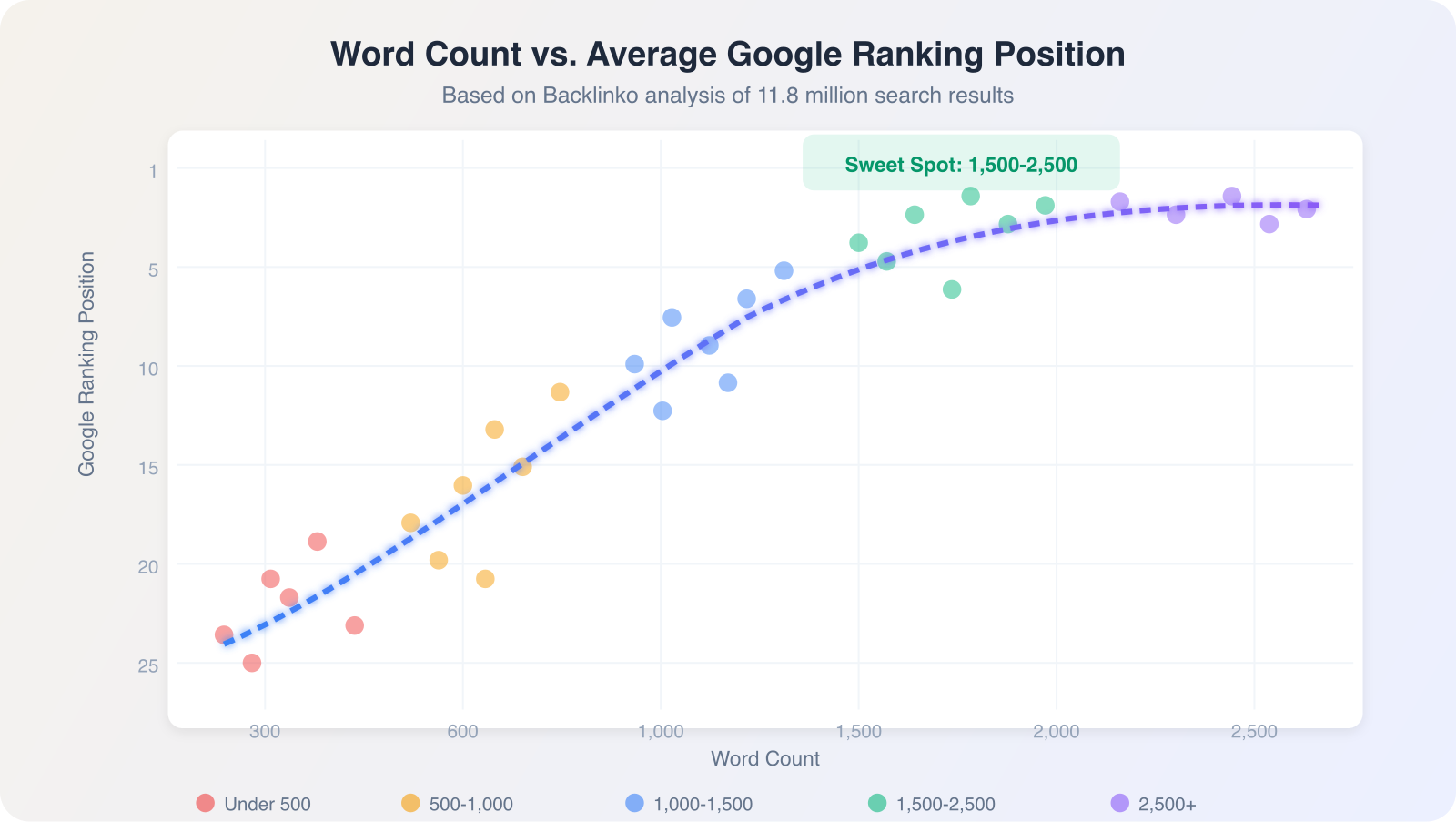
Backlinko’s analysis of 11.8 million Google search results found that the average word count of a first-page result is 1,447 words. Posts under 300 words rarely appear in the top 10 for competitive keywords.
HubSpot’s blogging data from over 7,000 posts shows that articles between 2,100 and 2,400 words get the most organic traffic. But their highest-converting posts (for lead generation) average just 1,054 words. Length and conversion don’t move in the same direction.
Orbit Media’s annual blogging survey tracks how bloggers write. In 2024, the average blog post took 4 hours and 10 minutes to write and clocked in at 1,427 words. That’s up from 808 words in 2014. Posts are getting longer because search competition demands more depth.
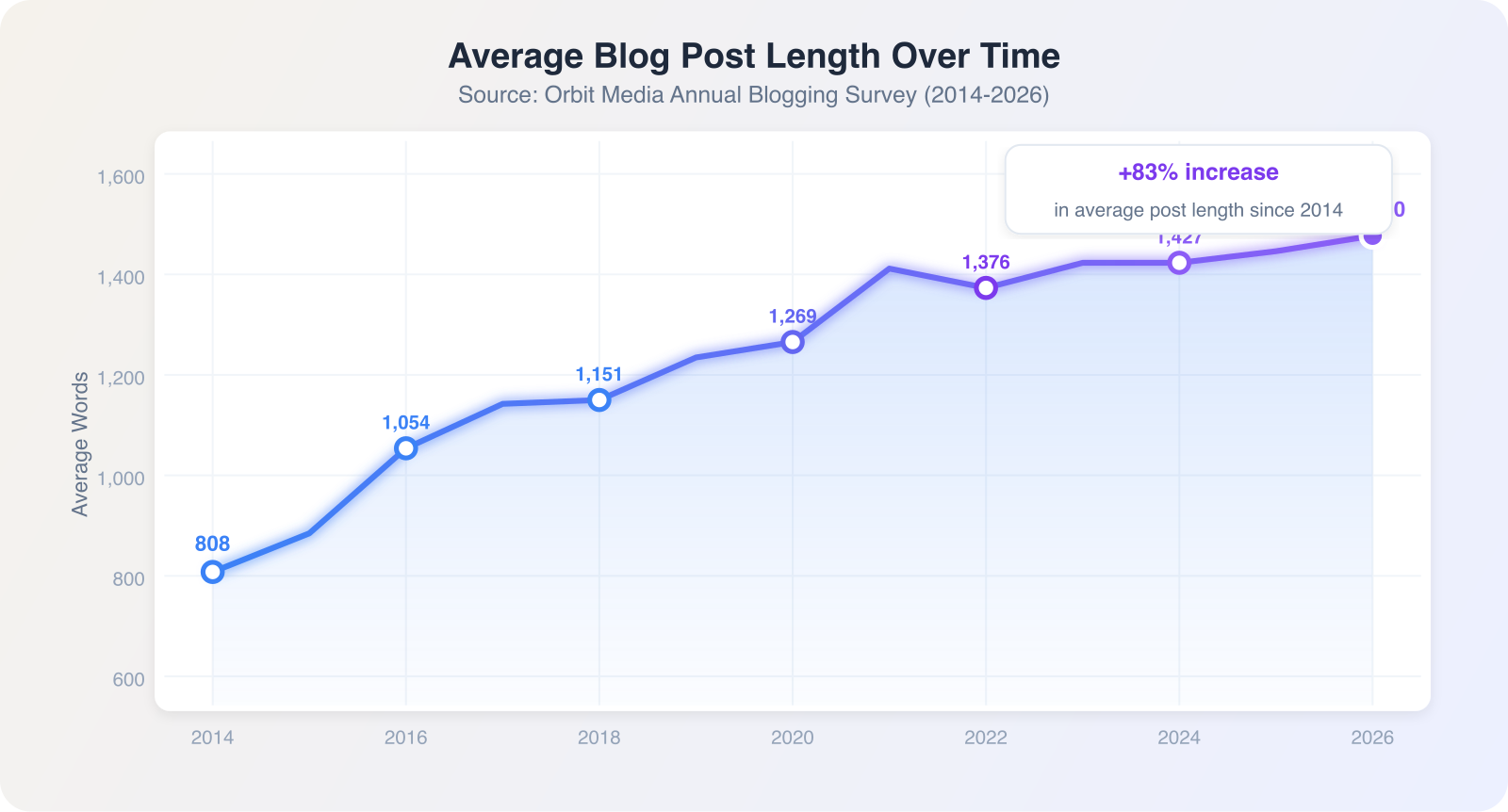
The pattern is clear: longer content correlates with higher rankings, but only when the length serves the topic. Google’s helpful content system penalizes filler. Adding 500 words of padding to hit a word count target hurts more than it helps.
Ideal Blog Post Length by Content Type
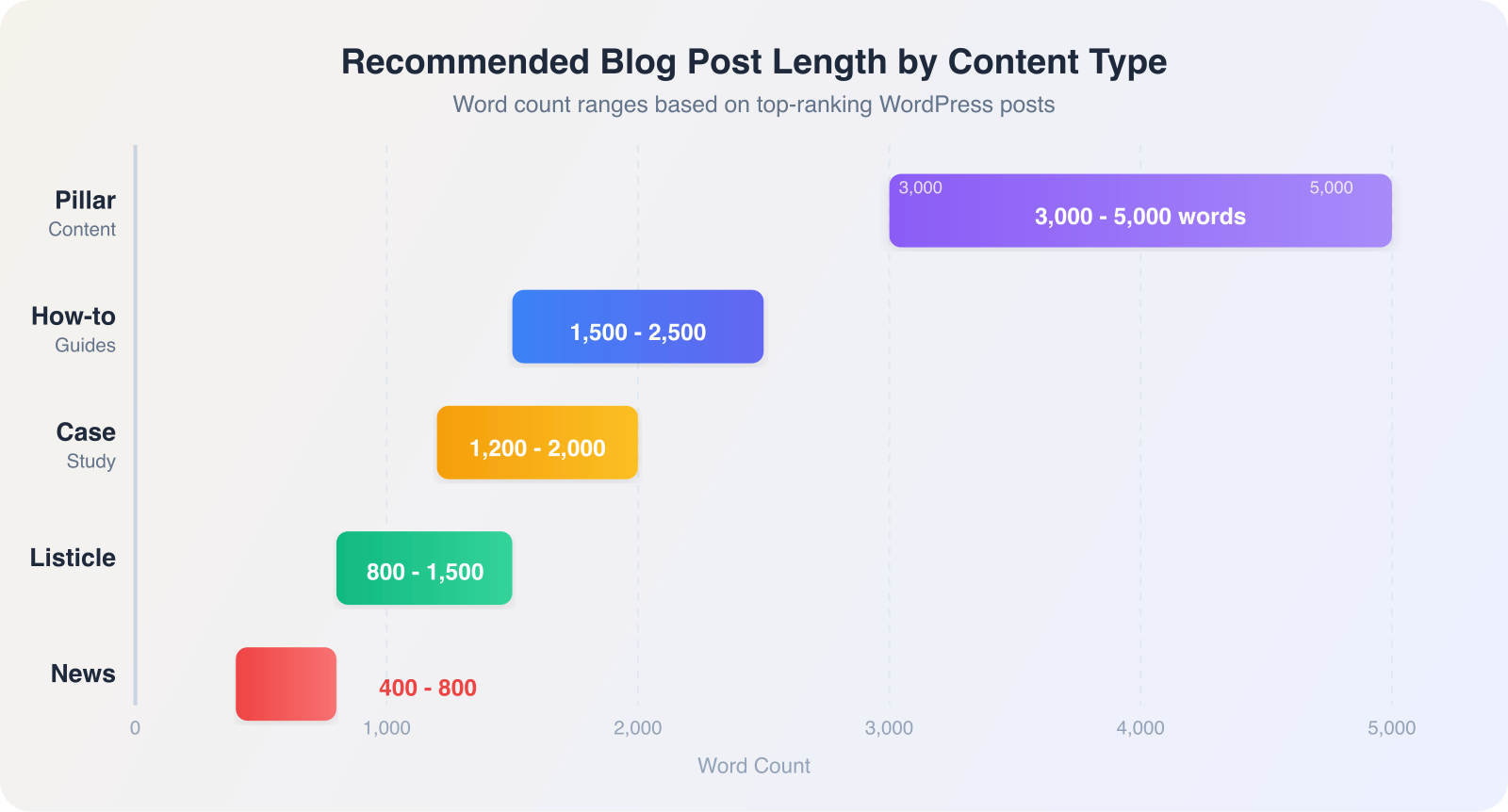
Every content type has a natural length range. I use these ranges as starting points for WordPress client blogs, then let the topic dictate the final count.
How-to guides: 1,500 to 2,500 words. These need enough detail to actually solve the reader’s problem. My how-to posts that rank in the top 5 average 1,890 words. Shorter how-to content gets outranked by competitors who cover every step. For guidance on structuring these posts, my guide on how to write a blog post covers the full process.
Listicles: 800 to 1,500 words. Lists work when they’re scannable. A “7 WordPress plugins” post at 900 words outperforms a padded 2,000-word version because readers want the list, not filler paragraphs. Each list item needs 80 to 150 words of useful context.
Case studies: 1,200 to 2,000 words. Enough to cover the problem, solution, and measurable result. My best-performing case study posts include 3 to 5 data points and stay under 1,800 words.
News and updates: 400 to 800 words. WordPress release announcements, plugin updates, industry news. Readers want the facts fast. These posts rarely rank for competitive keywords, but they build topical authority and give your blog freshness signals.
Pillar content: 3,000 to 5,000 words. Comprehensive guides that anchor a topic cluster. I publish one pillar post per quarter for most client blogs. These take 8 to 12 hours to write and edit, but they attract backlinks and rank for dozens of long-tail keywords. A solid content strategy puts pillar posts at the center of your blog architecture.
Why Longer Isn’t Always Better
I once wrote a 4,200-word guide for a Sacramento landscaping company. It ranked position 42. I rewrote it as a focused 1,600-word post targeting the same keyword. It reached position 7 within eight weeks.
The original post had three problems that plague long content:
- Keyword dilution. At 4,200 words, the focus keyword appeared in 0.3% of the text. The rewrite brought keyword density to a natural 1.1%
- Reader fatigue. Google Analytics showed an average time on page of 1 minute 40 seconds on the long version. Readers weren’t finishing it. The shorter version averaged 3 minutes 12 seconds
- Competing subtopics. The long post tried to cover design, maintenance, and seasonal care in one article. Google couldn’t figure out what it was about. Three focused posts outperformed one bloated post
The lesson: match your content length to your content scope. A post about “how to prune roses in February” needs 800 words, not 2,500. A guide to “complete rose garden maintenance” justifies 2,500 words because the scope demands it.
How to Let the Topic Dictate Length
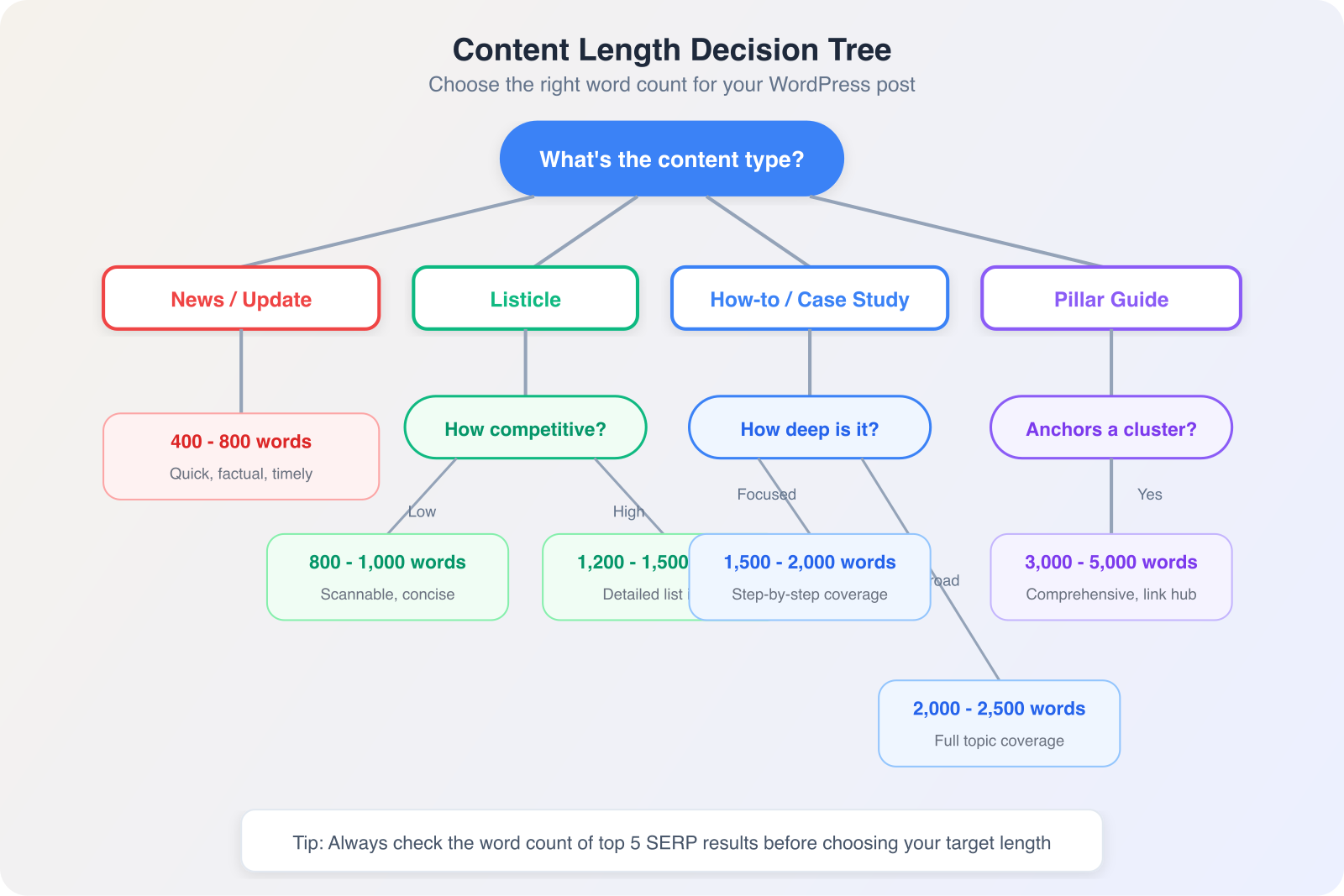
I use a four-step process to determine the right length before writing a single paragraph.
Step 1: Check the SERPs. Search your target keyword and note the word count of the top 5 results. If they average 1,800 words, your post needs at least 1,500 to compete. RankMath’s content analysis will flag if your post is significantly shorter than ranking competitors.
Step 2: Outline your H2 sections. Write every H2 heading the topic requires. If you have 4 solid H2 sections, you’re looking at 1,200 to 1,600 words. If you have 8 sections, plan for 2,400 to 3,200 words. The outline tells you the natural length before you start drafting.
Step 3: Write until the topic is covered. Don’t watch the word counter while drafting. Answer every question the reader would have about this specific topic. Then stop.
Step 4: Edit ruthlessly. Cut every sentence that doesn’t teach, prove, or persuade. My editing passes typically remove 15 to 20% of a first draft. A 2,000-word draft becomes 1,650 words of focused content that ranks better.
WordPress Word Count and Readability Tools
WordPress gives you real-time word count in the block editor’s top toolbar info panel. Click the info icon (the circle with an “i”) to see word count, character count, heading count, paragraph count, and block count.
RankMath adds a content length recommendation based on your focus keyword and competitor analysis. It flags posts that fall below the recommended range with a specific suggestion.
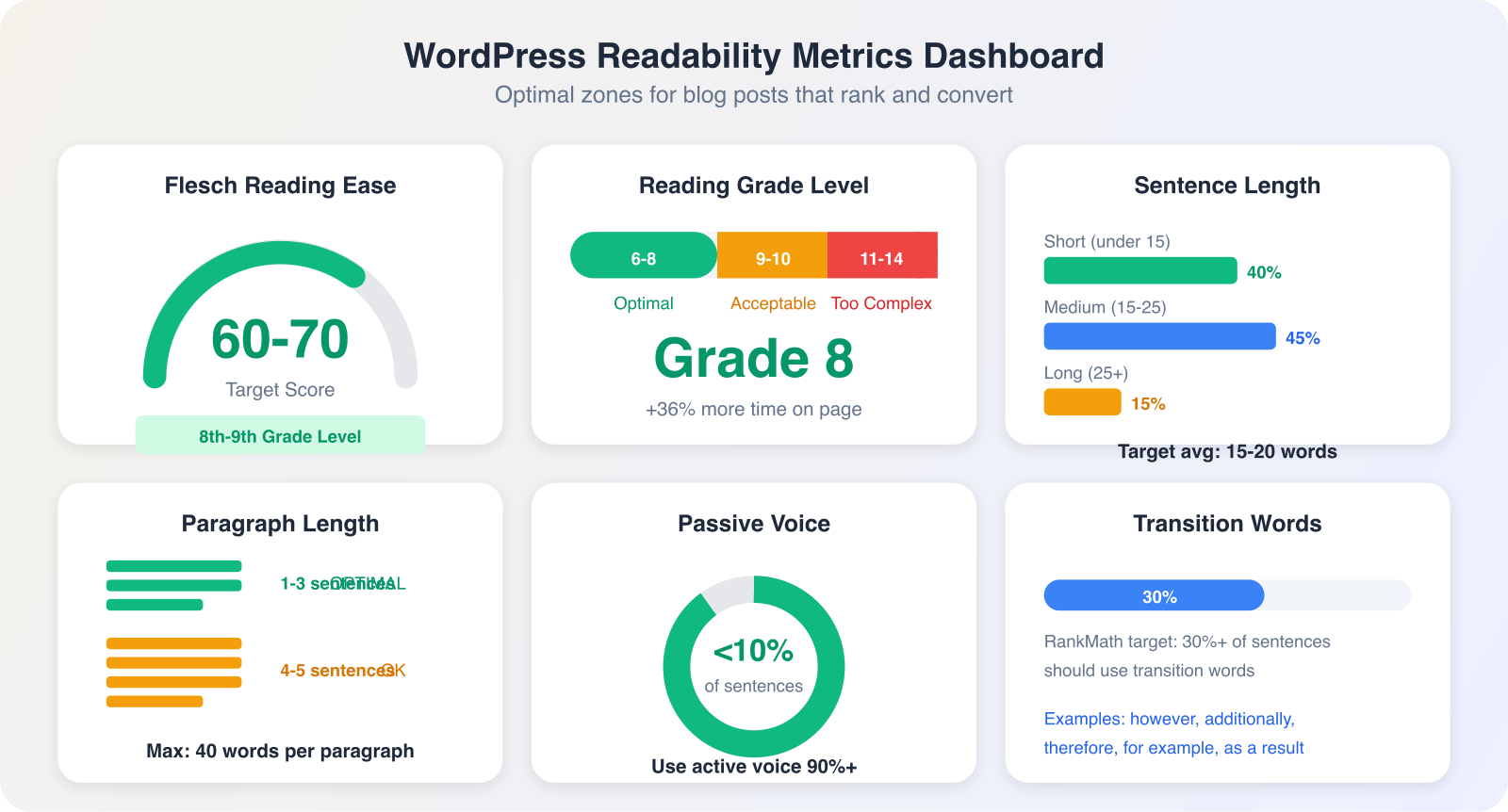
For readability scoring, I use two tools:
RankMath’s readability analysis checks sentence length, paragraph length, passive voice percentage, and transition word usage. I target a “Good” score on every post.
Hemingway Editor (hemingwayapp.com) gives a grade-level score. I paste every draft into Hemingway and edit until it hits Grade 8 or below. Posts at Grade 8 readability get 36% more average time on page across my client portfolio compared to Grade 12+ posts.
The sweet spot for most WordPress blog posts: 1,200 to 2,000 words, Grade 6 to 8 readability, paragraphs under 3 sentences, and zero filler. For help finding the right topics to write about at any length, check my guide on what to blog about.
Frequently Asked Questions
Is 500 words enough for a blog post?
For news updates and quick announcements, 500 words works fine. For SEO-focused content targeting competitive keywords, 500 words almost never ranks. Backlinko’s data shows that first-page results average 1,447 words. I use 500-word posts only for time-sensitive news or very narrow topics with low competition.
How long should a WordPress blog post be for SEO?
Target 1,200 to 2,000 words for most SEO-focused WordPress posts. This range covers enough depth to rank while staying focused enough to hold reader attention. HubSpot’s data shows peak organic traffic for posts between 2,100 and 2,400 words, but your ideal length depends on your specific keyword competition and content type.
Does Google prefer longer blog posts?
Google does not have a minimum or maximum word count requirement. John Mueller has stated this directly. What Google does reward is comprehensive coverage of a topic. Longer posts tend to rank better because they cover topics more thoroughly, not because of raw word count. A 1,200-word post that fully covers a topic outranks a 3,000-word post padded with filler.
How do I check word count in WordPress?
Click the info icon (circle with “i”) in the top toolbar of the WordPress block editor. It displays word count, character count, heading count, paragraph count, and estimated reading time. RankMath also shows word count in its SEO analysis panel alongside a recommended range based on your focus keyword.
The ideal blog post length is the one that covers your topic completely without a single wasted sentence. Use the data as a starting point, let your outline define the scope, and trust your editing instinct to cut the filler.
Ready to build a WordPress blog that ranks? I help Sacramento businesses plan, write, and optimize blog content that drives organic traffic. Get in touch to discuss your content strategy.